When is a generative AI assistant worth using? It may help when you need a first draft, a summary, or a clearer explanation—but its usefulness depends on the task and how much effort it takes to check the result. These tools can save time, but they can also produce errors or handle information in ways you may not expect. This guide explains what generative AI assistants do, where they may help, and how to weigh their limits, privacy considerations, and fit before using one.
What generative AI assistants are
A generative AI assistant is software that responds to instructions by creating content, such as text or, in some products, other types of media. You might ask it to explain a concept, draft a message, or summarize material. Unlike conventional search, which typically points you to sources to explore, an assistant generates a response directly. Its answer may not include the sources you need to check it.
Scripted chatbots usually follow set flows, such as asking fixed questions or directing you to a particular service. Other software may perform a specific task without generating a conversational response. These distinctions can blur: some products combine different approaches. Features and supported tasks vary, so check what a particular assistant can do before relying on it.
How they produce responses
A generative AI assistant uses patterns learned from training to create a response to your prompt. The prompt may include a question, instructions, or material you provide, and that context helps shape what the assistant produces. The response is generated rather than simply retrieved as a fixed answer, though some products may also use other tools or information sources.
These systems can produce fluent, well-organized wording, but that does not prove the response is accurate or that the assistant reliably understands the topic. It may miss important context, make a plausible-sounding error, or give an answer that needs current information. Treat its output as something to assess, not as proof. For important claims, check reliable sources independently.
Generative AI Assistants vs. Traditional Chatbots
Traditional rule-based chatbots follow predefined scripts or decision paths. Generative AI assistants produce responses using learned patterns and the prompt, which may make them more flexible but less predictable. Their ability to use conversation context varies by product.
| Aspect | Rule-based chatbot | Generative AI assistant |
|---|---|---|
| Response generation | Uses preset replies or flows | Generates a response to the prompt |
| Flexibility | Works within defined paths | May handle a wider range of requests |
| Conversation context | Often follows a set sequence | May use prior messages, depending on the product |
| Common use cases | Routing, FAQs, and fixed service tasks | Drafting, summarizing, or explaining |
| Limitations | May not handle unexpected requests | May produce inaccurate or unsuitable responses |
Either type can be useful for the right task. Some modern chatbot products combine rule-based and generative technologies.
What they can help you do
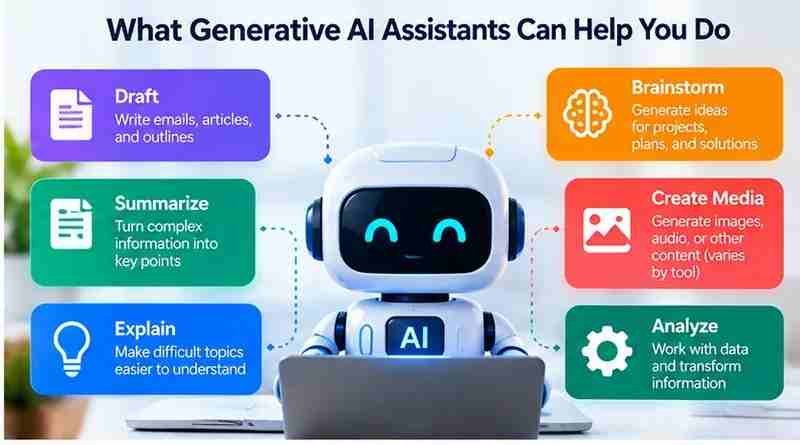
Generative AI assistants may support several kinds of work, though features vary by product. For example, you can ask one to draft an email or outline for you to revise, summarize notes into key points, brainstorm ideas for a project, or explain an unfamiliar concept in simpler language. Some assistants can also analyze, transform, or generate text and other media, such as images or audio. Those tasks depend on the product’s supported inputs and outputs, so check its capabilities before relying on them.
For practical examples of drafting, editing, and improving written content with AI, read our guide to ChatGPT for Writing.
These uses are often most helpful as starting points. Check that the response fits your purpose, and correct errors before using it.
Everyday situations where they may be useful
For a personal task, you might ask an assistant to turn a list of errands into a workable plan or draft a message you can edit. For learning, it could explain an unfamiliar concept in simpler terms or help you generate questions to explore while studying. At work, it may help shape a first draft, organize meeting notes, or suggest options for a project.

These examples are starting points, not guarantees. An assistant is more likely to be useful when your request is clear and you provide relevant context, such as the audience for a message or the purpose of a plan. Review the result for errors, missing details, and whether it suits your situation before acting on it. The more important the outcome, the more carefully you should check it.
Examples of Generative AI Assistants
These products are examples of generative AI assistants. Their features and supported tasks can change, so check each product’s official information before choosing one.
Explore Generative AI Assistants
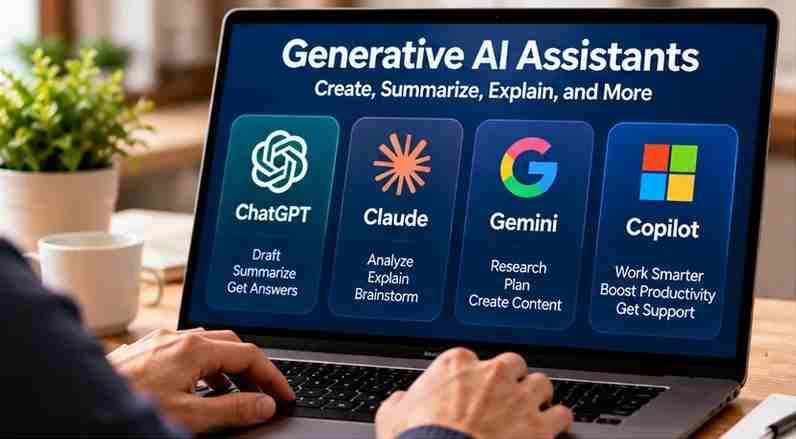
If you want to explore generative AI assistants, you can visit the official websites of ChatGPT, Claude, Google Gemini, and Microsoft Copilot. These tools offer different capabilities for tasks such as drafting, summarizing, brainstorming, and answering questions. Before choosing one, compare its current features, pricing, availability, and privacy settings to determine which option best fits your needs.
ChatGPT
ChatGPT is an assistant for generating responses to prompts. Consider whether its current features suit your tasks and review its data practices.
Claude
Claude is another conversational AI assistant. Check its current capabilities, access options, and privacy information for your intended use.
Google Gemini
Gemini is Google’s generative AI assistant. Review its current features and how its terms and data practices fit your needs.
Microsoft Copilot
Microsoft Copilot is a AI assistant. Its features may depend on the product or account, so confirm what is available before relying on it.
Where their limits matter
A generative AI assistant can make plausible claims that are wrong, omit important details, or rely on information that is outdated. It may also struggle when instructions are ambiguous or key context is missing. A confident tone does not show that the response is accurate or that the assistant can judge what is appropriate for your situation.
Check consequential claims against dependable, independent sources rather than relying on the assistant’s answer alone. This is especially important when information could affect your health, finances, legal position, safety, or other significant decisions. An assistant may help you organize questions or understand general information, but it is not a substitute for qualified expert judgment. If you cannot verify an answer or its limits are unclear, do not treat it as a reliable basis for action.
Read Also: DeepSearch AI Explained: Capabilities, Limitations, and What to Check Before You Use It
Privacy and security considerations
Before using an assistant, check the service’s privacy information and settings so you understand how it may handle prompts, uploaded files, and account data. Practices can vary, so do not assume that information you share is private or used only to generate a response. Avoid entering sensitive details—such as personal, financial, health, or confidential work information—unless you understand how the service handles them and have permission to share them.
Consider the policies that apply to your account and workplace. An employer or school may restrict which tools or information you can use, and an account’s settings may differ from those of a personal account. Also review device policies, especially on shared or managed devices. When in doubt, remove identifying details or choose a safer way to complete the task.
How to choose an assistant
Start with the task you want help with. An assistant suited to drafting may not support the files or media you need. Compare options against your priorities:
- Tasks and formats: Does it support your intended work and the inputs and outputs you need?
- Ease of use and accessibility: Is it straightforward to use and compatible with the access features you rely on?
- Cost: Does the price fit your budget, including any features you may need?
- Privacy controls: Can you understand and manage how your information is handled?
- Verification: Can you check important responses against dependable sources or review the output yourself?

If you’re comparing different AI assistants, our guide to ChatGPT Alternatives explains how to evaluate other options based on your needs.
Choose based on the task rather than assuming one tool fits every need. If you cannot verify important results or are unsure how your data may be used, consider another approach. Weigh the help you expect against the effort and safeguards required to use the assistant responsibly.
How to get more useful responses
Start with the result you want, then give the assistant relevant context: who the response is for, what it needs to cover, and any details it should take into account. Set clear constraints, such as length, tone, format, or what to leave out. For example: “Draft a brief, friendly reminder for a colleague about Friday’s deadline. Keep it under 100 words and don’t add details I haven’t provided.”
If the first response misses the mark, explain what to change or add rather than starting over. You can also ask the assistant to flag uncertainties or organize its answer in a format that is easier to review. Clearer instructions can make a response more relevant, but they do not guarantee accuracy. Treat the result as a draft or starting point: check claims, fill gaps, and make sure it suits your needs before using it.
Use them with appropriate oversight
Review an assistant’s output before you rely on it, especially when a decision involves health, money, law, safety, or another high-impact matter. Check important claims against dependable sources, and seek qualified human guidance when the stakes are high or the answer is uncertain. Keep privacy in mind, too: avoid sharing sensitive information unless you understand how the service may handle it and are permitted to do so. An assistant can help you organize information or prepare questions, but it should not replace your judgment or appropriate expert review. Use an assistant when its help outweighs the verification and privacy costs.
Frequently Asked Questions
1. What are generative AI assistants?
Generative AI assistants are tools that create responses based on user instructions. They can help with writing, summarizing, brainstorming, explaining concepts, and other tasks, depending on their capabilities.
2. How do generative AI assistants work?
Generative AI assistants use trained AI models to produce responses based on prompts and provided context. Some products can also use connected tools or additional information sources.
3. What are some examples of generative AI assistants?
ChatGPT, Claude, Google Gemini, and Microsoft Copilot are examples. Their features, supported tasks, pricing, and privacy settings vary by product.
4. What can generative AI assistants help with?
They can help draft emails, summarize documents, brainstorm ideas, organize information, and explain unfamiliar topics. Some assistants also support images, audio, or other media.
5. Are generative AI assistants always accurate?
No. Generative AI assistants may produce incorrect information, outdated claims, or incomplete explanations. Verify important facts using reliable sources before relying on their responses.
6. Are generative AI assistants free to use?
Some generative AI assistants offer free access with usage or feature limitations. Other capabilities may require paid subscriptions. Check each provider’s current pricing and available plans.
7. Are generative AI assistants safe for personal information?
Privacy depends on the provider’s policies, account settings, and data-handling practices. Avoid sharing sensitive information unless you understand the applicable protections and permissions.
8. How do I choose the best generative AI assistant?
Compare tools based on your tasks, supported features, accuracy needs, ease of use, pricing, and privacy controls. Test suitable assistants with realistic, low-risk tasks before deciding.
Conclusion
Generative AI assistants can help individuals, students, and professionals with everyday activities such as writing, summarizing, brainstorming, learning, and organizing information. Tools including ChatGPT, Claude, Google Gemini, and Microsoft Copilot offer different capabilities that may support these tasks. However, their usefulness depends on the specific product, the instructions provided, and the quality of the generated responses. Although these assistants can save time and provide useful starting points, they may also produce inaccurate information or overlook important context. Before choosing a generative AI assistant, consider your main goals, supported features, accessibility, pricing, and how easily you can review its output.
Accuracy, privacy, and responsible use should remain important considerations when working with generative AI assistants. Verify significant factual claims using dependable sources, particularly when information could influence health, financial, legal, or other consequential decisions. Review each provider’s privacy policy and account settings before sharing personal details or confidential materials. A practical starting point is to test an assistant with a simple, low-risk task, provide clear instructions, and evaluate whether the results meet your needs. Comparing multiple tools using similar tasks can also help identify their strengths and limitations. By combining AI-generated assistance with careful review and human judgment, you can use these tools more effectively without relying on their responses unquestioningly.