Advanced AI assistants can help with writing, research, learning, planning, and other everyday tasks. But what makes an AI assistant meaningfully more useful than a basic chatbot? The answer depends on your needs. Some tools can handle longer conversations, process files and images, or connect with external services, while others focus on straightforward questions. Capabilities vary by product and task. This guide explains how to evaluate advanced AI assistants, understand their limitations, and choose a tool that fits your needs.
What an advanced AI assistant is
An advanced AI assistant is an AI tool designed to help with a range of requests, not just respond to a narrow set of questions. It may use earlier parts of a conversation to keep track of what you’re asking, and help with tasks such as drafting text, analyzing information, planning a project, or working with material you provide.
That flexibility does not mean every assistant can do all of these things well. Features and performance differ by product, and results depend on the task and the information available. “Advanced” is a general description, not a formal technical certification or a guarantee that an assistant is accurate, reliable, or right for your needs. It’s more useful to check what a particular tool can do and how well it handles the tasks you care about.
Capabilities that may make an assistant more useful
Some features can make an AI assistant more useful, but they are not standard across all products. Check whether a specific tool offers what you need and how well it works in practice:
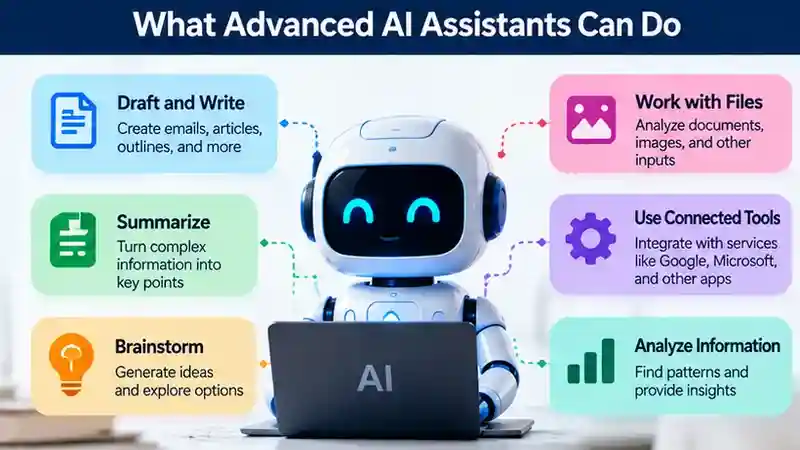
- It may keep track of earlier details in a conversation, though it can miss context, especially in longer exchanges.
- It may work with input beyond text, such as files or images. Check which formats it supports and what it can do with them.
- It may connect to external services or tools. Check which connections are available and what access they require.
- You may be able to request a particular tone, level of detail, or format, such as a summary or checklist.
- It may help break a larger task into stages, but you may still need to guide the process and review each result.
Availability and performance vary by product and task, so test relevant features against your own needs.
Basic Chatbots vs. Advanced AI Assistants
A basic chatbot may answer common questions or guide you through a defined service. An advanced AI assistant may handle a broader range of requests, use more conversation context, or work with additional input types and tools. These are general distinctions, not fixed categories: capabilities vary by product, and performance depends on the task.
| Area | Basic Chatbot (Often) | Advanced AI Assistant (May) |
|---|---|---|
| Context Handling | Follows a limited conversation flow or handles one question at a time. | Uses earlier messages to inform responses, within context limits. |
| Supported Input Types | Primarily accepts text or predefined choices. | Accepts text, images, audio, or files, depending on the product and plan. |
| Connected Tools | Provides answers from preset content or limited integrations. | Connects to tools or services to retrieve information or take permitted actions. |
| Multistep Tasks | Handles simple requests with predefined steps. | Helps plan and complete tasks involving several steps, with varying reliability. |
| Human Oversight | Needs human help for exceptions or requests outside its scope. | Needs review of important outputs and appropriate approval for consequential actions. |
These descriptions are only starting points; check the capabilities of each product rather than assuming every chatbot or assistant fits the same profile. For a closer look at how AI-generated responses differ from scripted chatbot interactions, read our guide to Generative AI Assistants: Uses, Limits, and Risks.
How people use advanced AI assistants
Advanced AI assistants can support everyday tasks at work, while learning, and in personal planning. For example, you might use one to brainstorm ideas for a presentation, draft an email, or summarize a report you provide. For more practical examples of drafting and editing with an AI assistant, see our guide to ChatGPT for Writing. A student could ask it to explain a difficult concept in simpler terms, then check the explanation against course materials. For personal organization, it might help compare options you list or turn a set of priorities into a draft plan.

These tools can help organize information and produce a starting point, but their output still needs review. Check summaries against the original material, verify factual claims, and confirm calculations rather than relying on a confident-sounding answer. For consequential choices—such as decisions involving health, money, legal matters, or work—use relevant expert judgment and trustworthy sources. An assistant can help you prepare questions or consider options, but it should not replace professional advice.
Examples of Advanced AI Assistants
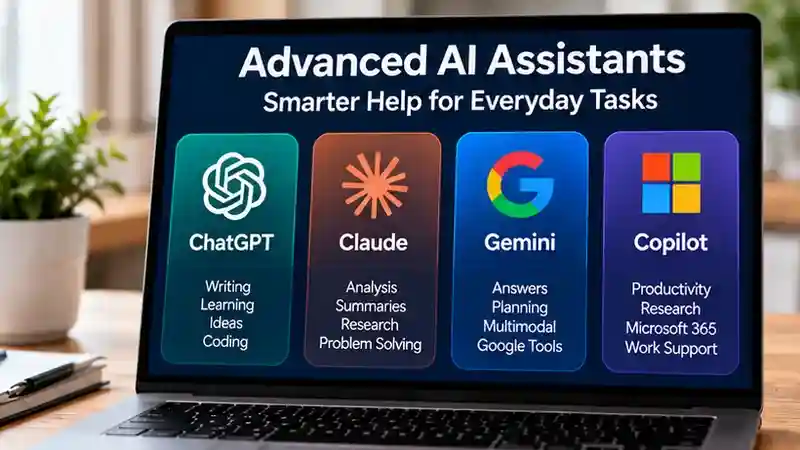
Several AI assistants are available today, including ChatGPT, Claude, Google Gemini, and Microsoft Copilot. Although these tools share some common purposes, such as answering questions, helping with writing, and organizing information, they differ in their features, integrations, and user experience. The right choice depends on your specific tasks, preferences, and requirements. Below is a closer look at four widely known AI assistants, their typical uses, and important factors to consider before choosing one.
ChatGPT
ChatGPT is OpenAI’s general-purpose AI assistant for conversational help with writing, learning, brainstorming, and coding. Typical uses include drafting emails, explaining unfamiliar concepts, and organizing ideas into a workable outline. When choosing it, consider how well its responses fit your tasks, what usage limits apply, and how your information is handled. As with any advanced AI assistant, check important claims and review generated work before using it.
Claude
Claude is Anthropic’s AI assistant, designed to help with tasks such as writing, analysis, coding, and understanding supplied material. You might use it to revise a report, explore an argument, or turn detailed notes into a clearer summary. Consider whether its writing style and explanations suit your needs, alongside applicable usage limits and privacy settings. Its responses can still contain mistakes or miss context, so review conclusions against the original material.
Google Gemini
Google Gemini is Google’s AI assistant for tasks such as answering questions, developing ideas, drafting text, and explaining topics. Typical uses include brainstorming a project, comparing approaches, or creating an initial draft to refine. If you already use Google products, check which connections are available for your account rather than assuming everything works together. Also consider data settings, account requirements, and whether its answers provide enough support for the decisions you are making.
Microsoft Copilot
Microsoft Copilot is Microsoft’s AI assistant for help with questions, writing, brainstorming, and everyday problem-solving. You might use it to outline a document, simplify a technical explanation, or explore options before starting a project. When choosing it, distinguish the consumer assistant from Copilot offerings associated with workplace software. Available capabilities and data protections can depend on the offering and account, so check the relevant terms and review important outputs before relying on them.
How to evaluate an assistant before relying on it
Test an assistant on tasks you actually expect to use it for, such as summarizing material you provide, drafting a message, or organizing a plan. Use realistic instructions and information; a polished demo may not show how the tool handles your needs.
- Choose a representative task and give the assistant the kind of input and constraints you would use in everyday work.
- Check whether it follows your instructions, including the requested format, tone, and limits. If something is unclear, note whether it asks a useful question or makes an assumption.
- Verify important answers against trustworthy material. Check factual claims and redo calculations independently when they matter.
- Try a correction: point out a mistake or clarify your request, then see whether the response improves.
If you are considering more than one tool, give each the same task and compare the results. Focus on accuracy, usefulness, and how much effort it takes to review the output—not just how confident or polished it sounds.
Accuracy, reasoning, and other limitations
An assistant can write clearly and still give an incomplete, mistaken, or unsupported answer. Treat its response as a useful starting point, not as proof that a claim is correct. Check important facts against trustworthy material, and verify calculations independently when they matter.
Results also depend on the information the assistant receives. If your request leaves out key details, it may make assumptions or miss context that changes the answer. Performance can vary across tasks, too: a tool that helps organize a draft may be less dependable for a specialized question. Follow-up questions and corrections can help, but they do not guarantee a sound result.
Feature labels and confident wording are not evidence of reliability. Judge an assistant by how it performs on tasks you care about, and keep human review in place when accuracy has meaningful consequences.
Privacy and security questions to ask
Before using an AI assistant, check what information the service collects and how it may handle what you submit, including prompts and uploaded files. Review the provider’s current terms and privacy settings rather than assuming that practices are the same across tools.
Look for the account and sharing controls available to you. Consider who can access your conversations, whether you can manage or delete them, and what options the service provides for controlling how your information is used. The details may vary by provider and account type, so check the settings that apply to your use.
Think carefully before entering sensitive information, such as personal, financial, health, or confidential work details. If you are unsure how a service handles that information, leave it out or use a less sensitive example. Privacy controls can help, but they do not remove the need to consider what you share.
Choosing the right tool for your needs
Choose an assistant based on the tasks you want it to handle, not how advanced it sounds. Consider whether it is easy to use, supports any tools or integrations you rely on, and offers privacy controls that suit the information you plan to share. Check available pricing and what features are included, since costs and access can vary.
Also consider the effort needed to review its work. A tool that saves time on drafts may be a good fit even if you need to check facts; one that requires frequent corrections may not suit a task where accuracy is critical. If you are comparing options, try the same representative task in each. The best choice is the one that works reliably for your needs and fits your workflow—not necessarily the one with the most features.
Read Also: How to Find a ChatGPT Alternative That Fits Your Needs
A simple way to get better results
Give the assistant a clear goal, the context it needs, any constraints it should follow, and the format you want. For example, ask it to summarize a document for a specific audience in five bullet points, using only the information in the document. If your request is ambiguous, invite it to ask clarifying questions before answering.

You can refine the response with follow-up instructions, such as asking for simpler wording or a different structure. Review the final result for accuracy and completeness before using it.
There is no single feature that makes an AI assistant the right choice. Judge it by how reliably it helps with tasks you actually do, how easily you can spot and manage its limitations, and whether its data practices suit your needs. Before adding one to an important workflow, try it on a small, low-risk task and review the result. That gives you a practical basis for deciding whether it is useful enough to rely on.
Frequently Asked Questions
1. What is an advanced AI assistant?
An advanced AI assistant is a tool that can help with writing, research, learning, planning, and other tasks. Depending on the product, it may also process files, images, or connected information.
2. How is an advanced AI assistant different from a basic chatbot?
Advanced AI assistants may handle more complex requests, use conversation context, support multiple input types, and connect with external tools. However, capabilities vary by product.
3. What are some examples of advanced AI assistants?
ChatGPT, Claude, Google Gemini, and Microsoft Copilot are examples of AI assistants. Each offers different features, integrations, usage limits, and user experiences.
4. What can advanced AI assistants help with?
Advanced AI assistants may help draft emails, summarize documents, explain concepts, brainstorm ideas, organize information, and plan projects. Their usefulness depends on the task and available features.
5. Are advanced AI assistants always accurate?
No. AI assistants can produce incorrect information, misunderstand instructions, or overlook important details. Verify factual claims, calculations, and consequential recommendations using reliable sources.
6. Are advanced AI assistants free to use?
Some AI assistants offer free access with certain limitations, while additional features or higher usage may require paid plans. Check each provider’s current pricing and access conditions.
7. Are advanced AI assistants safe for personal information?
Privacy protections vary by provider and account settings. Review data-handling policies and avoid sharing sensitive personal or confidential information without understanding the applicable protections.
8. How do I choose the best advanced AI assistant?
Compare assistants based on your tasks, accuracy needs, supported features, integrations, pricing, and privacy controls. Test the same realistic task across suitable tools before deciding.
Conclusion
Advanced AI assistants can support everyday activities such as writing, learning, research, planning, and organizing information. Tools including ChatGPT, Claude, Google Gemini, and Microsoft Copilot offer different approaches to AI-assisted tasks, with capabilities that may include conversation context, file processing, and connections to external services. However, the availability and usefulness of these features depend on the product, account, and task. More advanced functionality does not automatically guarantee accurate or reliable results. Before choosing an AI assistant, identify your main needs and compare supported features, ease of use, pricing, and integration options. The most suitable tool is one that performs well on tasks you regularly handle.
Accuracy, privacy, and human oversight are equally important when evaluating advanced AI assistants. Generated responses may contain errors, outdated information, or missing context, so important claims and calculations should be independently verified. Review each provider’s privacy policy and account settings before sharing personal information or confidential documents. A practical approach is to test several assistants using the same low-risk task, compare their responses, and assess how much correction or review they require. Clear instructions and thoughtful follow-up questions can improve usefulness, but they cannot eliminate every limitation. By combining AI assistance with careful verification and personal judgment, you can use these tools more effectively while maintaining control over important decisions.