ChatGPT can help with everyday writing tasks, such as getting ideas onto the page, organizing notes, or revising a draft. But it does not replace your goals, knowledge, or review. Its suggestions may need correction, added context, or a different voice before they’re ready to use.
This guide explains how to give ChatGPT useful writing instructions, work with it at different stages, and edit its output with care. It also covers checking factual claims, protecting sensitive information, and recognizing when AI assistance may not be appropriate. The aim is to keep you in control of the writing while using ChatGPT where it can help.
Try ChatGPT for Writing
If you want to explore ChatGPT for your own writing tasks, you can try it through the official ChatGPT website. Start with a simple request, such as brainstorming ideas, creating an outline, or improving a paragraph you have already written. Give clear instructions, review the suggestions carefully, and make any necessary changes before using the final text.
What ChatGPT Can—and Can’t—Do for Writers
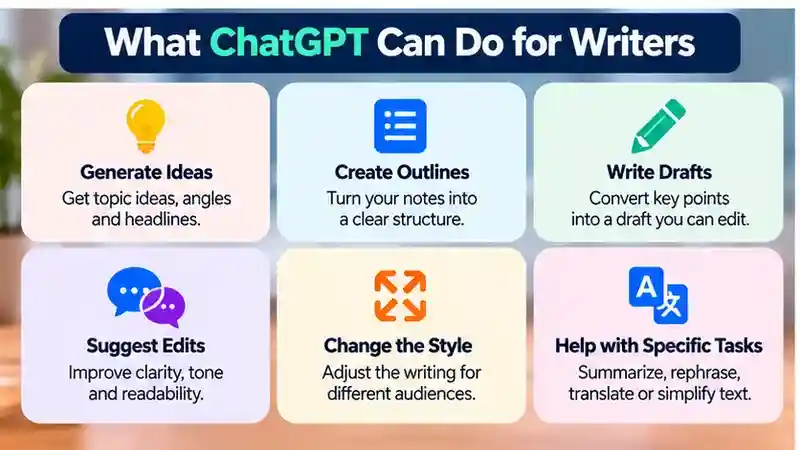
ChatGPT can be a useful partner at several points in a writing project. You might ask it to suggest possible angles, group related ideas, or turn a set of notes you provide into a rough draft. It can also offer edits, such as pointing out unclear sentences or suggesting a more concise version. These uses work best when you give it a specific task and enough context to understand what you need.

That assistance is not the same as dependable expertise or original reporting. ChatGPT may produce plausible-sounding details that are incomplete or wrong, and a polished paragraph is not proof that its claims are accurate. It also cannot decide what matters most to your audience or supply firsthand knowledge you have not provided. The result may be generic, miss important context, or fail to match your voice.
Think of its output as material to assess, not finished copy to accept automatically. Its usefulness depends on the task, the information you provide, and your review. You remain responsible for deciding what to keep, correct, or remove.
Start With the Task, Not Just the Topic
Before you prompt, decide what the writing needs to accomplish. A topic alone—such as “email marketing”—doesn’t tell ChatGPT what kind of help you want. Specify the purpose, intended reader, format, tone, approximate length, and any constraints. That context makes the request more actionable, though it cannot guarantee a useful or accurate response.
For ChatGPT for writing, a focused prompt usually works better than a broad request. Describe the audience, purpose, tone, and essential details before asking for a draft.
For example, you might ask for a friendly 200-word email to existing customers announcing a schedule change. You could add that the message should state the new hours clearly, avoid promotional language, and use only details in your notes. These directions help distinguish the task from a social media post, a formal policy notice, or a general article on the same subject.
Consider including:
- Purpose: What should the piece explain or help the reader do?
- Audience: Who will read it, and what do they already know?
- Format and tone: Is it an email, guide, or another format? Should it sound warm, formal, or direct?
- Length and constraints: How long should it be, and what must it include or avoid?
Give relevant context, but avoid sharing sensitive details. You can refine the request if the first response misses the mark.
Use ChatGPT Across the Writing Process
Rather than asking ChatGPT to produce a finished piece in one go, use it for distinct steps and make decisions at each one. This keeps your notes, knowledge, and goals at the center of the work.

If you want to compare writing workflows and available features, our ChatGPT Plus subscription guide explains what to check before deciding whether a paid plan fits your needs.
- Generate and narrow ideas. Share the subject and purpose, then ask for possible angles or questions to explore. Choose the options that fit your readers and project, and set aside the rest.
- Organize an outline. Provide the angle you chose and any requirements. Ask for a structure, then check that it follows a sensible order and includes the points your piece needs.
- Draft from your notes. Supply the relevant material and ask for a rough draft in the format and tone you want. Tell ChatGPT to use only the details you provide, then review the result for gaps or unsupported additions.
- Revise in focused passes. Ask for help with one issue at a time, such as making a section clearer or shortening sentences. Compare suggestions with your intended meaning before adopting them.
Separating these tasks gives you chances to correct the direction before more prose is built on it. Your source material should guide each step, and you should decide what belongs in the final piece. Treat every response, including the draft, as a starting point for review—not a finished deliverable.
Prompts You Can Adapt
Replace the placeholders with details from your project. These templates are starting points, not guarantees of accuracy or quality; review the response and refine your request as needed.
One way to practice ChatGPT for writing is to test a prompt on a short passage, review the response, and refine your instructions before attempting a longer document.
For more ways to access writing assistance while browsing, see our guide to ChatGPT Chrome extensions, including what to verify before installing a browser tool.
- Brainstorming: “Suggest [number] distinct angles for a piece about [topic] for [audience]. Its purpose is to [purpose]. For each angle, include a question it could explore.”
- Outlining: “Create an outline for a [format] about [topic] for [audience]. The piece should [purpose], include [requirements], and avoid [constraints]. Use a logical order and base it on these notes: [notes].”
- Drafting: “Turn the material below into a rough [format] for [audience]. Use a [tone] tone and aim for [length]. Follow these requirements: [requirements]. Use only the supplied material and flag gaps rather than filling them in: [source material].”
- Editing: “Review the text below for [specific issue, such as clarity or concision]. Preserve its meaning and [voice or tone]. Suggest targeted changes and note where context seems missing: [text].”
Check whether each response fits your needs. You can narrow the request, add relevant context, or ask for a focused revision. Review factual claims and make the final choices yourself.
Edit for Meaning, Voice, and Specificity
Read generated prose for more than grammar. Look for broad phrases that could apply to almost any subject, missing context your readers need, and paragraphs that feel out of order or repeat the same point. Check whether the wording sounds like you and suits the audience—not just whether it sounds polished. Smoother language is not necessarily more accurate or effective.
When using ChatGPT for writing, compare each suggested edit with your original meaning. Keep improvements in clarity and remove generic or inaccurate wording.
When something needs work, ask for a focused revision. For example, you might request a clearer explanation of one paragraph, a shorter version that preserves a key detail, or alternatives for a sentence that feels too formal. Point out what must stay, such as your meaning, tone, or terminology. Narrow requests make it easier to judge whether a proposed change addresses the problem.
Compare each revision with your original intent and what your audience needs to understand. Restore details the rewrite has lost, add context only you can provide, and reject changes that distort your meaning or voice. You make the final choices: keep, adapt, or discard suggestions based on the purpose of the piece.
Check Facts and Protect Sensitive Information
Fluent wording can make a claim sound certain, but it does not prove the claim is true. Before using factual details in your writing, check them against trustworthy sources relevant to the subject. Pay particular attention to names, dates, figures, quotations, and statements about people or organizations. If you cannot verify a claim, remove it, qualify it, or find a source that supports it. Do not treat a generated reference or explanation as confirmation on its own.

For information about privacy settings when using ChatGPT, read OpenAI’s official Data Controls FAQ and review which settings apply to your account.
Also consider what you share in a prompt. Confidential work material, personal details, and other sensitive information may not belong in a writing request. When possible, remove identifying details or replace them with general placeholders. Before entering information, check the service settings and policies that apply to your account and situation; do not assume how submitted material may be handled.
These checks are part of editing, not a sign that you have used ChatGPT incorrectly. Review the output, confirm what matters, and leave out information you do not need to share.
When AI Assistance May Not Be Appropriate
Some writing depends on judgment or experience that ChatGPT cannot supply. A personal reflection, for example, should represent what you actually think and have lived through. Reporting or research that requires original evidence also calls for your own work: generated text is not a substitute for gathering and checking evidence.
If ChatGPT does not fit your workflow, explore our overview of ChatGPT alternatives and compare their suitability for your writing tasks.
That does not mean AI assistance is always off limits. You might use it to organize your notes or improve clarity, while keeping the underlying judgment and evidence your own. Before doing so, consider the purpose of the work and any rules that apply in your setting. Follow relevant requirements for AI use or disclosure, and do not present unverified generated claims as research you conducted. When the task’s expectations are unclear, check them before relying on AI assistance. The key is to choose a role for ChatGPT that fits the work—and be transparent where required.
A Simple Review Checklist
Before using or sharing a draft, take a moment to check:
Treat ChatGPT for writing as a drafting and editing aid rather than an automatic publisher. Verify important claims, preserve your voice, and make the final decisions yourself.
- Does it serve the purpose you intended?
- Have you checked every factual claim against trustworthy sources?
- Does the wording suit your reader and sound right for your voice?
- Have you removed unsupported details, irrelevant material, or anything that should not be included?
- Have you considered privacy and checked any rules that apply to using or disclosing AI assistance?
If something is unclear or does not belong, revise it or leave it out. ChatGPT is an optional assistant, not a requirement for good writing. You direct the work, decide what to keep, and remain responsible for the final draft.
Frequently Asked Questions
1. How can I use ChatGPT for writing?
You can use ChatGPT for writing by brainstorming ideas, creating outlines, drafting content, and improving existing text. Provide clear instructions and review its suggestions before using them.
2. Can ChatGPT help improve my writing skills?
ChatGPT can suggest clearer sentences, better organization, and alternative wording. Comparing these suggestions with your original writing may help you recognize areas for improvement and develop stronger editing habits.
3. What types of writing can ChatGPT help with?
ChatGPT can assist with emails, blog posts, reports, outlines, social media content, and other writing tasks. Its output should be reviewed for accuracy, relevance, and appropriate tone.
4. How do I write better prompts for ChatGPT?
Explain your writing goal, target audience, preferred tone, format, and approximate length. Include relevant context and specific requirements to help ChatGPT generate more useful suggestions.
5. Can ChatGPT write an entire article?
ChatGPT can generate an article draft, but the result may contain errors, unsupported claims, or generic information. Review, fact-check, and revise the content before publishing.
6. How can I edit AI-generated writing?
Check the draft for clarity, factual accuracy, structure, repetition, and tone. Remove unsupported information, restore missing context, and adjust the wording to reflect your intended meaning.
7. Is it safe to share personal information with ChatGPT?
Avoid including unnecessary personal details or confidential material in writing prompts. Review the privacy settings and policies that apply to your account before sharing sensitive information.
8. Can I use ChatGPT for professional or academic writing?
ChatGPT can help organize ideas, improve clarity, and revise drafts. However, follow applicable workplace or academic rules, verify important claims, and maintain responsibility for the final work.
Conclusion
ChatGPT for writing can be a useful assistant for brainstorming ideas, organizing outlines, preparing drafts, and improving existing content. Whether you are writing emails, blog posts, reports, or other materials, its suggestions can help you explore different approaches and refine your wording. However, effective results depend on providing clear instructions and reviewing the generated text carefully. Start by defining your writing purpose, intended audience, preferred tone, and format. Break larger projects into manageable stages, such as planning, drafting, and editing, rather than expecting a single prompt to produce a finished piece. This approach helps keep your ideas and goals at the center of the writing process.
Using ChatGPT for writing also requires attention to accuracy, originality, privacy, and personal voice. AI-generated content may contain incorrect facts, repetitive language, or statements that lack necessary context. Before publishing or sharing a draft, verify important claims against trustworthy sources and revise anything that does not reflect your intended meaning. Avoid sharing unnecessary confidential information, and follow relevant academic or workplace requirements when using AI assistance. Treat ChatGPT as a tool for supporting your writing decisions rather than replacing your knowledge or judgment. Ultimately, the goal is to create clear, useful, and reliable content that communicates your ideas effectively while keeping you responsible for the final result.