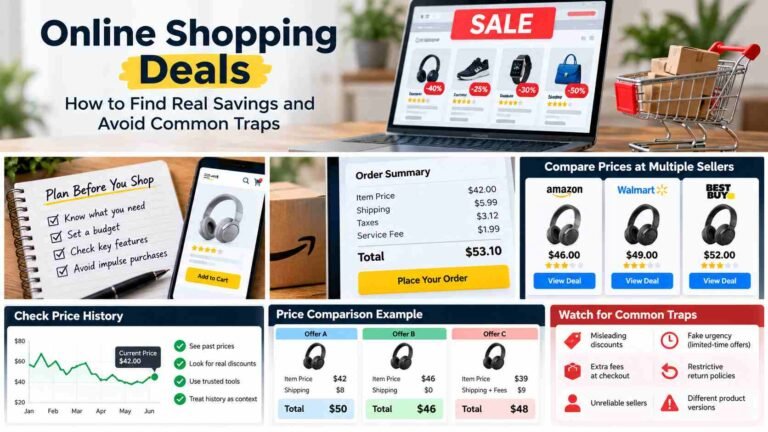
Best Buy online shopping gives you a way to compare products and review order options before you buy. A little preparation can help you focus on the features you need, understand the total cost, and choose delivery or pickup that suits your schedule. This guide walks through those decisions, along with reviews, returns, and a final order check. Prices, product availability, and policies can change, so confirm the current details for your item on Best Buy’s official website before placing an order.
Start with the product you actually need
Before browsing, think about how you will use the product and which features matter for that job. For a laptop, for example, consider whether you need it mainly for web browsing and email, or for work that calls for more memory or a particular screen size. The right choice depends on your tasks, not on having the most features.
Set a spending limit before comparing options, then separate must-haves from appealing extras. A must-have might be enough storage for your files; a premium finish or an additional accessory may be nice but not essential. If you are shopping for a TV, decide what size fits your room and which connections your devices require before weighing features you may rarely use.
Keeping those priorities in mind makes it easier to compare relevant products and avoid stretching your budget for extras that do not serve your needs.

Search and narrow the options
Search Best Buy’s site with terms that describe both the product and what you need from it, such as “13-inch laptop,” “4K TV,” or a specific model number. If the site offers filters for your search, use relevant ones to narrow the results, then review the listings rather than relying on product names alone.
Before comparing options, confirm that each listing matches your requirements. Check the exact model, size, configuration, and any compatibility needs, such as whether a device works with equipment you already own. Similar-looking results may differ in features or setup, so don’t assume they are interchangeable. If a result is unclear, review its product details before adding it to your comparison.

Read Also: AI in Ecommerce: Practical Uses, Benefits, and Trade-Offs
Compare listings beyond the headline price
A product’s name and displayed price don’t tell the whole story. Compare the specifications that matter for your use, such as size, storage, or included features, and check what accessories come with the item. If you need a particular cable, stand, or other add-on, confirm whether it is included or sold separately.
Pay attention to the item’s condition and, when shown, who is selling or fulfilling it. These details can affect what you’re buying and how the order is handled. Similar product names may refer to different versions or configurations, so compare the exact model information on each listing rather than assuming two items are identical.
Then look beyond the headline price to the costs displayed for your order, such as any applicable shipping charges and taxes. The final amount can depend on the item and fulfillment choice, so review the details shown before deciding which listing offers the better fit and value.
Best Buy Online Shopping vs. In-Store Shopping
Shopping online lets you compare listings and review options before leaving home. Visiting a store lets you see a product in person and ask for help face to face. The better choice depends on what you need to check.
| Shopping Factor | Online Shopping | In-Store Shopping |
|---|---|---|
| Product browsing | Compare listings at your own pace. | Browse items displayed in the store. |
| Availability | Check availability for your location online. | Ask staff about local stock. |
| Inspection | Review photos and product details. | See or handle displayed products. |
| Delivery or pickup | Review available options during checkout. | Ask which options are available for the item. |
| Price verification | Check the current listing and order total. | Confirm the price at the store before buying. |
| Assistance | Use available online support resources. | Speak with store staff in person. |

Services and availability may vary by location, so check the options shown for your item and area.
Read reviews with care
Customer reviews can help you spot details that product specifications don’t cover, but they’re best treated as one part of your decision. Look for specific observations that come up repeatedly and relate to your needs, such as comments about setup, everyday use, or a feature you consider essential. A single complaint or compliment may reflect one person’s circumstances rather than a common experience.
Consider the context of each review, including which product or configuration the reviewer bought and how they used it. Feedback about a different model or version may not apply to the listing you’re considering. Weigh clear, relevant patterns alongside the product details, and treat individual opinions as evidence to consider—not a guarantee of how the product will work for you.
For additional guidance on evaluating customer reviews and comparing online sellers, see the FTC’s online shopping advice.
Check price, promotions, and payment details
Review the current price shown for the item and read any promotion terms before relying on a reduced amount. Offers may have conditions, such as applying only to certain products or requiring an extra step, so confirm that the price displayed for your order reflects the offer you intend to use. Check the taxes and any shipping charges shown, then use the order total to understand what you will pay.
For more ways to compare discounts and avoid misleading offers, read our guide to Online Shopping Deals.
If payment or financing options are offered, read their terms before choosing one. Check eligibility requirements, payment amounts, and any other conditions that apply; don’t assume an option is available for every purchase. Compare the amount due and terms that apply to you, and confirm the final total before submitting your order.
How Best Buy’s Price Match Guarantee Works
Best Buy’s Price Match Guarantee lets shoppers request a lower price on an eligible product when it meets the terms in Best Buy’s policy. Not every advertised price qualifies: eligibility can depend on the product, the seller, and the offer’s details, and exclusions may apply. Before making a request, check Best Buy’s official Price Match Guarantee page for the current list of qualifying competitors, product rules, and excluded offers. The policy also explains how to request a match and what information Best Buy may need. Follow the listed process and provide the relevant product and price details; Best Buy reviews requests under its terms, so approval isn’t guaranteed.
Choose delivery or pickup carefully
Once you’ve chosen an item, compare the fulfillment choices shown for your location. The options can differ by product and area, so don’t assume every item is eligible for every method. Check the availability details and estimated timing for each choice, and review any fees displayed before deciding.
Consider what works with your schedule and how you’ll receive the item. Delivery may suit you if you can receive it at the address provided; pickup may be more convenient if a store option is available and you can get there. Use the details shown during checkout to compare the choices rather than relying on general expectations.

Before submitting the order, confirm the selected method and check that the delivery address or pickup store is correct. If the displayed availability, timing, or cost doesn’t fit your needs, review the other options available for that item and location.
Review returns, warranty, and support information
Before ordering, check the return conditions and deadline that apply to your purchase, along with any exclusions or product-specific exceptions. Best Buy’s official Return & Exchange Policy page is the place to review the current terms, but confirm how they apply to the exact item you’re buying. Policies may vary or change, so don’t rely on assumptions or details from an older purchase.
A return policy, a manufacturer warranty, and an optional protection plan are different forms of coverage. Best Buy’s return policy explains when and how an item may be returned or exchanged. A manufacturer warranty addresses coverage provided by the product’s manufacturer, while an optional protection plan may have separate terms and conditions. Review the relevant documents to understand what each covers, how to request support, and any limitations before you buy.
Place the order and keep a clear record
Before submitting your order, review the cart and checkout details one more time. Confirm that each item is the model and configuration you intended to buy, and check the quantity. Compare the displayed price and order total with the amount you expect to pay, including any taxes or charges shown.
Next, verify the fulfillment choice: delivery or pickup, as applicable. For delivery, check that the address and contact details are correct. For pickup, confirm the selected store and any details shown for collecting the order. Correct any mistakes before placing the order.
After checkout, save the order confirmation and any relevant tracking updates. Keeping these details together can make it easier to refer to your purchase or follow its progress. If something looks different from what you expected, use the order information to check the details on Best Buy’s official website.
Shop online with basic account security
Use a trusted internet connection when signing in or entering payment details, and choose a unique password for your shopping account rather than reusing one from another service. A password manager can help you keep track of different passwords. Avoid making purchases over a connection you don’t trust, especially if you can wait until you’re on a more secure network.
Be cautious with unexpected messages about an order, particularly if they ask you to click a link or provide personal or payment information. Instead of following a suspicious link, open Best Buy’s official website or app directly and check your order information there. If a message seems unusual, verify the details through the retailer’s official channels before responding or taking action.
These precautions matter when evaluating unfamiliar shopping websites, too. Our Alaikas.com for USA Shoppers guide explains what to check before trusting a retailer or entering payment information.
A quick checklist before checkout
- Does the product fit your needs and budget?
- Have you confirmed the exact model and configuration?
- Does the total include the taxes and charges shown?
- Are the fulfillment method, timing, and address or store correct?
- Have you checked the return terms for this item?
- Does the final order summary match what you intend to buy?
Before placing your order, confirm these details on Best Buy’s site. Product availability, prices, and policies can change, so use the current information shown for your purchase.
Frequently Asked Questions
1. How does Best Buy online shopping work?
Best Buy online shopping lets customers browse products, compare specifications, review prices, and place orders through its website. Available delivery and store pickup options depend on the product and location.
2. How can I compare products on Best Buy?
Compare products using their model numbers, specifications, features, condition, and included accessories. Read relevant customer reviews and check the total cost before choosing.
3. Does Best Buy offer price matching?
Best Buy offers a Price Match Guarantee for eligible products and qualifying offers. Check its current official policy for participating competitors, exclusions, and request requirements.
4. Can I order online and pick up at Best Buy?
Store pickup may be available for eligible products at participating locations. Check pickup availability, the selected store, and collection instructions before completing your order.
5. How much does Best Buy delivery cost?
Delivery charges depend on the product, location, and available shipping options. Review any applicable fees and estimated delivery timing during checkout before placing your order.
6. Can I return products purchased online from Best Buy?
Eligible online purchases may be returned or exchanged under Best Buy’s current Return & Exchange Policy. Return deadlines, exclusions, and conditions can vary by product and purchase.
7. Is Best Buy online shopping safe?
Shopping through Best Buy’s official website helps reduce the risk of fraudulent lookalike sites. Use secure account credentials, verify website addresses, and review payment details before checkout.
8. What should I check before placing a Best Buy order?
Confirm the product model, configuration, quantity, final price, taxes, and delivery or pickup details. Review applicable promotions, return conditions, and the checkout summary before submitting your order.
Conclusion
Best Buy online shopping allows customers to explore electronics, compare product specifications, review customer feedback, and evaluate purchasing options before placing an order. Whether you are shopping for a laptop, television, or another device, choosing the right product involves more than comparing advertised prices. Check the exact model, configuration, included accessories, and features that matter for your intended use. Customer reviews may provide additional context, but they should be considered alongside official product information. Also review current promotions, any applicable price-matching conditions, and the complete order total. A careful comparison can help you make a purchase that fits your needs and budget.
Before completing your Best Buy online shopping order, confirm the available delivery or store pickup options, estimated timing, and any additional charges. Review the applicable return policy, manufacturer warranty, and optional protection terms so you understand what coverage may apply. Since product availability, prices, and retailer policies can change, verify the latest details on Best Buy’s official website. During checkout, double-check the product quantity, selected model, payment amount, delivery address, or pickup store. After placing the order, save your confirmation and relevant tracking information. Taking these practical steps can reduce avoidable purchasing mistakes and help you shop with greater confidence.