An online shopping deal is worthwhile only when the final price, the product, and the purchase terms suit you. A large discount label may look appealing, but it does not tell you whether the item is competitively priced, whether extra costs apply, or whether you can return it if it is not right for you.
Before buying, decide what you need and what you are willing to spend. Then compare the same product across reputable sellers, check the total at checkout, and read the details on delivery, returns, and any offer conditions. Coupons, cashback, and sale events can help, but they are worth considering only when the terms work for you. This guide shows how to assess online shopping deals step by step—and when it may be better to pass.
What Counts as a Good Online Deal?
A good online deal is about more than the percentage shown beside a price. A large markdown may be based on an unclear original price, while the amount you actually pay could be close to what the item costs elsewhere. Focus on whether the current price is competitive and whether the product meets your needs.
Check the item’s condition and specifications, too. A new product, a refurbished one, and an open-box item are not necessarily comparable, even if their listings look similar. Confirm that the model, size, quantity, and included accessories match what you intend to buy.
Then consider the full cost and the terms. Shipping, fees, and any required membership can change the checkout total. Return rules matter as well: a low price may be less appealing if returning the item is costly or restricted. In short, judge the offer by the price you will pay for the product you want—and the conditions you accept—not by the advertised discount alone.
Start With the Product, Not the Promotion
Before browsing, decide what you need and set a reasonable budget. Be as specific as you can: note the features, size, quantity, or condition that would make a product suitable, and the most you are willing to pay. This gives you a clear basis for comparing offers.
Starting with your needs can also help limit impulse purchases. A countdown, “limited-time” message, or bold discount label can make an offer feel urgent, but it does not show whether the product fits your needs or budget. If you begin with the promotion, you may be tempted to spend more than planned—or buy something you would not otherwise have considered.
Once you know what you are looking for, compare equivalent products rather than whichever listing appears cheapest or most heavily discounted. Check that the model, specifications, quantity, and condition match. If an offer pushes you beyond your budget or toward a poor fit, the discount may not make it worthwhile.
Compare the Total Cost
The price shown on a product page may not be the amount you pay. Add the item to your cart and review the checkout total before placing your order. Check the shipping charge, taxes shown for your order, and any service or handling fees. If a lower price requires a subscription or paid membership, include that cost when deciding whether the offer makes sense for you.
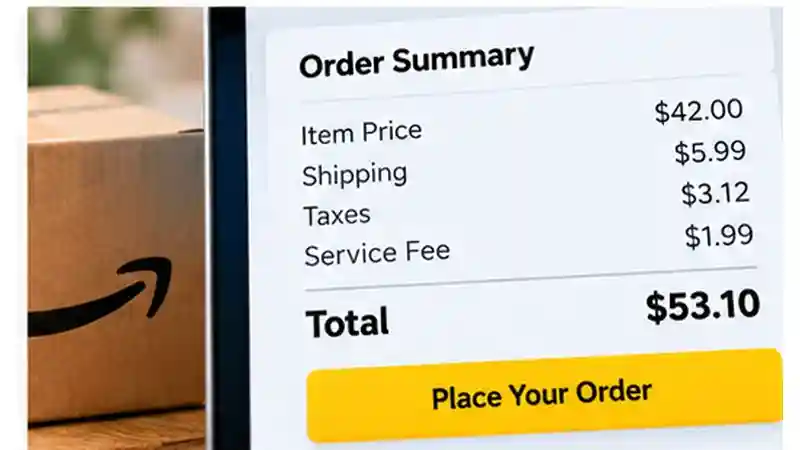
If a lower price requires a paid membership, compare the membership cost with the benefits you actually use. Our Prime Shopping guide explains how to assess whether Amazon Prime provides enough value for your shopping habits.
Make sure you are comparing like with like. Check the exact model, size, quantity, and condition at each seller. A listing for a different version or a smaller pack may have a lower item price but offer less of what you need. Also confirm what is included, such as accessories, if those affect the comparison.
For example, one seller’s item price may look lower, but shipping or fees could make its checkout total higher than another seller’s. Compare the final totals for equivalent products, and note any required membership cost separately if it applies only over time or to other purchases. The checkout page gives you a clearer basis for comparison than the advertised price alone; review it before you commit to the purchase.
Check Whether the Price Is Actually Competitive
Once you know which product you want, compare its current price at more than one reputable seller. Check that each listing is for the same model, size, quantity, and condition; otherwise, a lower price may reflect a different version of the item. Comparing several offers can show whether a deal is competitive, even when no seller advertises the biggest discount.
If price-history information is available, use it to see how the listed price compares with prices recorded in the past. Treat that history as context, not a promise that the current offer is good. A tool may not track every seller or listing, and its records may not reflect every change in price. Coverage and details can vary. For example, Keepa provides price-history tracking for supported Amazon products, which can help shoppers put current prices into context.
Comparison tools and price histories are useful aids, but neither guarantees value. A recorded price does not tell you whether the product suits your needs or whether the seller’s terms are acceptable. Use these checks to question a promotion and put the current price in perspective, then decide whether the offer is worth pursuing. If you cannot confirm that you are comparing equivalent products, look more closely before relying on the result.
Online Shopping Deals: Price Comparison Example
Consider three hypothetical offers for the same new pair of headphones. The illustrative prices below are examples only, not current retailer offers. Including shipping and fees shows how the item price can differ from the amount you pay overall.
| Offer | Item Price | Additional Costs | Final Total |
|---|---|---|---|
| Offer A | $42 | $8 shipping | $50 |
| Offer B | $46 | $0 shipping | $46 |
| Offer C | $39 | $5 shipping + $4 fees | $48 |

All prices in this example are hypothetical, not actual retailer offers, and exclude taxes for simplicity. Although Offer C has the lowest advertised item price at $39, shipping and additional fees increase its total to $48. Offer B provides the lowest overall cost at $46, assuming the products and purchase terms are equivalent. Before choosing, compare the product specifications, condition, delivery options, and return policies. A good online shopping deal is not simply the lowest advertised price—it should offer the best overall value for your needs and budget.
Use Coupons, Promo Codes, and Cashback Carefully
A coupon or promo code can lower the price, but check its terms before counting on the savings. Look for eligibility rules, excluded products or brands, expiration dates, and minimum-spend requirements. A code may apply only to certain items or may not work with another offer.
Enter the code at checkout and confirm that the discount appears in the order total before you buy. If it does not, review the conditions and check that the products in your cart qualify. Do not assume a code has worked just because a promotion page lists it.
Cashback and rewards can also reduce the effective cost, but treat them as potential savings, not guaranteed discounts. Check which purchases qualify, what steps you need to take, and any restrictions on receiving or using the reward. The amount may not be reflected in the checkout total, so compare the price you will pay now with and without the offer. If the terms are unclear, make your decision based on the confirmed price rather than a saving you may not receive.
Understand Sale Events and Urgency Tactics
Seasonal sales and limited-time promotions can make it easier to notice an offer, but an event label does not tell you whether the price is competitive. Compare the final cost with prices for the same product at other reputable sellers, and check shipping, fees, and any purchase requirements. Review the return policy and delivery details, too. A lower event price may come with terms that do not suit you.
Countdowns and messages such as “only a few left” are cues to verify the offer, not proof that it is misleading. Check that the listing is for the product, model, and condition you want, and confirm that the displayed discount applies at checkout. If you cannot complete those checks before a promotion ends, it is reasonable to pause rather than rush. The offer may not be the lowest available, and missing a sale is preferable to buying something that does not fit your needs or budget. Make the decision based on the confirmed price and terms—not the event name or timer.
Check the Seller, Product, and Return Policy
A competitive price matters only if the listing is for the right product and the purchase terms work for you. Before paying, check:
- Confirm who is selling the item, especially on a marketplace, and review the available seller information and customer feedback.
- Match the model, size, specifications, and included accessories to what you need. Check whether the item is new, refurbished, or open-box.
- Review the warranty: who provides it, what it covers, and whether any limits apply.
- Check the estimated delivery date and any shipping conditions.
- Read the return window, eligible conditions, and any return-shipping costs or other fees. Look for restrictions that could make a return difficult.
Read the relevant product, warranty, delivery, and return policies before you pay. If important details are missing or unclear, do not assume the terms will be favorable. Compare another listing or contact the seller for clarification.
Read Also: Best Buy Online Shopping: How to Compare Products, Prices, and Delivery Options
How to Spot Fake Discounts and Misleading Deals
An unclear original price or a dramatic percentage discount can make an offer look better than it is. Treat the markdown as a claim to check: compare the current price for the same model, size, quantity, and condition at reputable sellers. If you cannot tell what price the discount is based on, focus on the amount you would actually pay.
Be cautious if a price seems unusually low or the product description is vague, inconsistent, or missing key specifications. Check the listing against the manufacturer’s product details when available, and inspect the retailer’s website to see whether the offer and its terms are clearly explained. A countdown or pressure to buy immediately is another reason to pause and verify, not proof by itself that the deal is fraudulent.
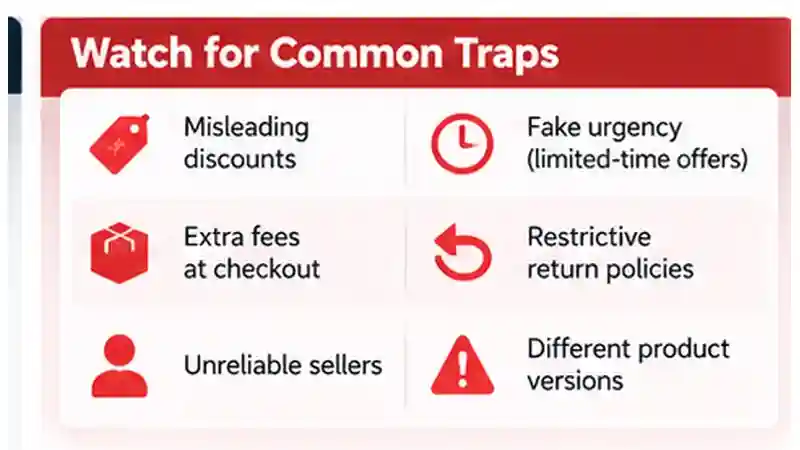
These signs are reasons to look more closely, not confirmation of fraud on their own. If the product details do not match, the price cannot be compared, or important offer terms remain unclear, consider another listing or skip the purchase.
For additional guidance on avoiding misleading offers and online shopping scams, review the Federal Trade Commission’s online shopping advice.
Protect Your Payment and Personal Information
Before entering payment details, make sure you are using the retailer’s legitimate website or app. If you received an offer through a message or social post, avoid unfamiliar payment links; navigate to the retailer’s site independently and look for the offer there. A link that looks convincing is not enough to confirm where it leads.
Review the checkout page before submitting your order. Confirm the merchant, items, total, and delivery details, and remove any unexpected charges or products. Share only the information needed to complete the purchase. If you are asked for extra personal details that do not seem necessary, pause and check why they are required before continuing. You can also avoid saving payment details to an account if you do not need that convenience.
Use a payment method and checkout process you trust, and keep an eye on your account activity after buying. No payment method can prevent every problem, so treat unexpected requests or unfamiliar checkout pages as reasons to stop and verify. If something does not feel right, do not proceed until you understand what you are agreeing to.
For broader advice on protecting your accounts and personal information, explore CISA’s Secure Our World resources.
A Quick Checklist Before You Buy
Before placing an order, check:
- Need: Is this something you planned to buy, and does it fit your budget?
- Comparable price: Have you compared the same model, size, quantity, and condition at other reputable sellers?
- Full cost: Have you checked shipping, taxes shown, fees, and any required membership or subscription?
- Seller and product: Can you identify the seller and confirm the product details, condition, and warranty?
- Purchase terms: Are the delivery estimate, return rules, and return costs acceptable?
- Payment safety: Are you using the retailer’s legitimate site or app, and does checkout show the expected order and total?
If an important detail is unclear, verify it or consider another offer. A discount is not a reason to accept uncertainty or a poor fit; skipping the deal may be the better choice.
Not every retailer offers the same online shopping options. Our Ross Online Shopping guide explains why checking a retailer’s official purchasing channels matters before relying on an advertised deal.
Frequently Asked Questions
1. How can I find the best online shopping deals?
Compare prices for the same product across reputable retailers. Check the total cost, product condition, shipping fees, and return policy before deciding which offer provides the best value.
2. How do I know if an online shopping deal is genuine?
Verify the seller, compare prices at other retailers, and review the product details. A large advertised discount does not necessarily mean the offer provides genuine savings.
3. Are online shopping coupons and promo codes worth using?
Coupons and promo codes can reduce costs when they apply to your purchase. Check expiration dates, minimum spending requirements, exclusions, and the final checkout total.
4. Can price-history tools help me save money?
Price-history tools can show previously recorded prices and help put current discounts into context. However, their coverage varies, so compare current retailer prices as well.
5. What hidden costs should I check before buying online?
Check shipping charges, taxes, handling fees, required memberships, and possible return costs. These expenses can make an advertised bargain more expensive than another offer.
6. How can I avoid fake online shopping deals?
Use legitimate retailer websites, verify seller information, and review product descriptions carefully. Be cautious of unusually low prices, unclear terms, and unexpected payment requests.
7. Are cashback offers always guaranteed?
No. Cashback offers may have eligibility requirements, exclusions, or other conditions. Confirm the terms and base your purchase decision on the price you must pay at checkout.
8. When is an online shopping deal not worth buying?
A deal may not be worthwhile if the product does not meet your needs, exceeds your budget, includes unexpected costs, or has unclear seller and return conditions.
Conclusion
Finding the best online shopping deals requires more than looking for large discounts or limited-time promotions. A worthwhile offer should provide the product you actually need at a competitive total price, with purchase conditions that fit your expectations. Before buying, compare equivalent products across reputable retailers, check their specifications and condition, and review the complete cost, including shipping, taxes, and additional fees. Price-history tools, coupons, and cashback offers may help identify potential savings, but their information and conditions should be verified. A discounted product is not automatically a good purchase, especially when it does not fit your budget or intended use.
Safe and informed shopping also means evaluating the seller, delivery arrangements, warranty coverage, and return policy before completing checkout. Be cautious of misleading discount claims, unfamiliar websites, unexpected payment requests, and promotions that pressure you to act immediately. Confirm that the retailer is legitimate, inspect the final order total, and use a payment method you trust. If important product details or purchase terms remain unclear, consider another offer rather than rushing into a decision. By combining careful price comparisons with basic online security practices, you can evaluate online shopping deals more confidently, avoid unnecessary expenses, and focus on purchases that offer practical value.