Could an AI assistant help with routine digital tasks, such as organizing ideas, revising a message, or making sense of information? It may be useful, depending on the tool, the task, and the details you provide—but assistants don’t all offer the same features or produce equally reliable responses.
This guide explains what AI assistants are and how they generate responses, then walks through practical ways to use one and get more relevant results. You’ll also find questions to consider when choosing a tool, along with guidance on checking answers and protecting your information. The aim is to help you decide where an assistant fits into your everyday work—and where your own judgment still matters.
What Is an AI Assistant?

An AI assistant is software that uses artificial intelligence (AI) to respond to requests and help with tasks. You might ask one to explain a topic, suggest ideas, or help revise a piece of writing. The assistant generates a response based on your request and the information available to it; it is not a person, and its answer may need to be checked.
“AI assistant” is a broad category, not the name of one specific product. Different tools may be designed for different purposes or offer different ways to interact. Some may support tasks such as working with documents or connecting with other software, while others may not. Even within one product, features and access can change between versions or plans.
That distinction matters when deciding what to expect. A general description of AI assistants can help you understand the kinds of tasks they may support, but it doesn’t confirm that a particular tool has a feature you need. Check the current details for the assistant you’re considering, and judge its usefulness by how well it handles your actual task.
How AI Assistants Work

An AI assistant starts with your prompt: the question, instruction, or material you provide. It uses that input, along with its design and available information, to generate a response intended to address your request. Depending on the tool, it may also be able to work with material you share or use other features, but those capabilities vary.
To understand the technology behind these responses, see our AI Systems guide, which explains how AI systems process inputs and produce outputs.
The wording and details of your prompt can affect what the assistant returns. A broad request may lead to a general answer, while a clear goal and relevant context can help it focus. Even so, the assistant may misunderstand what you mean or leave out important details.
A response that sounds confident and reads smoothly is not necessarily correct. The assistant can produce incomplete or mistaken information, so treat its output as something to review rather than as proof. For important claims, check reliable sources; for consequential decisions, use your own judgment and seek qualified human advice where appropriate.
What an AI Assistant Can Help You Do
Depending on the tool and the information you provide, an AI assistant may help with a range of everyday tasks. For example, you could use one to:
For a practical example of drafting and editing with an assistant, read our ChatGPT for Writing guide.
- Brainstorm possible topics, approaches, or names when you need a starting point. Treat suggestions as options to consider, then decide which ones fit your goal.
- Summarize material you provide, such as notes or a document. A shorter overview can help you review information, but check it against the original when details matter.
- Draft or revise text, such as outlining a message, adjusting its tone, or making a passage clearer. Review the final version to make sure it says what you intend.
- Explain a concept in plain language or describe an unfamiliar idea another way. If the explanation includes important claims, verify them before relying on them.
- Organize a plan by arranging tasks into steps, creating a checklist, or structuring a schedule around the constraints you share.
These are potential uses, not guaranteed features or outcomes. What an assistant can do depends on the tool, and the usefulness of its response may depend on your prompt and the context available to it. You may need to adjust your request or check the result before using it.
How to Get More Useful Responses
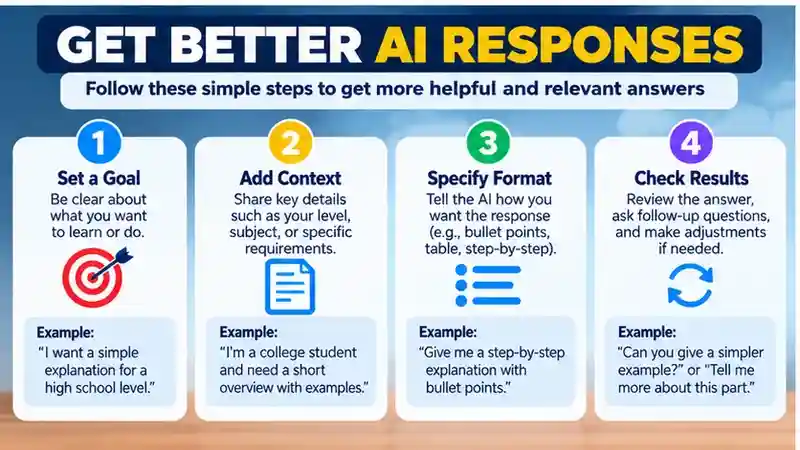
A clear request gives an AI assistant a better chance of addressing what you need. Start by stating your goal, then add relevant context: who the task is for, what you already know, or any details that could affect the answer. Specify useful constraints, such as length, tone, or a format like a checklist. You can also review the response and follow up if it misses something or needs a different focus.
For example, instead of asking, “Help me make a plan,” explain what the plan is for and how you want it organized:
“Help me plan a simple weeknight dinner routine for one person. I have limited time to cook. Suggest five dinners and present them as a checklist.”
That added purpose, context, and format can make the response more relevant, but it does not guarantee that every suggestion will be suitable or accurate. Read the result, check whether it fits your needs, and refine your prompt. You might ask the assistant to shorten the plan, account for a constraint you forgot to mention, or explain a suggestion. For important details, verify the information before relying on it.
How to Choose an AI Assistant

Start with the tasks you want help with. An assistant should be easy for you to use and offer features that suit those tasks. Compare your options with this checklist:
If you are comparing products, our ChatGPT Alternatives guide offers another starting point for evaluating options.
Intended tasks: Does it handle the kinds of requests you expect to make?
Ease of use: Is it straightforward to enter prompts, provide context, and review responses?
Available features: Does it support specific functions you need? Features can vary by tool and version.
Cost and access: Check current pricing, plan limits, and terms so you know what you can use and under what conditions.
Privacy: Review the tool’s settings and policies to understand how information you submit may be handled.
Fit with your tools: If it matters for your tasks, consider whether it works with the software or devices you already use.
Check the provider’s current product details and terms before deciding. Features, access, and policies can change, so don’t assume different assistants—or versions of the same assistant—are interchangeable. If you’re unsure, try a low-stakes task first and see whether the response and workflow suit you. Choose based on your needs, not just the length of a feature list.
Try ChatGPT: If you want to explore an AI assistant for brainstorming, summarizing information, drafting text, or explaining concepts, visit the official ChatGPT website. Review its available features and privacy settings before using it, and verify important answers against reliable sources.
Accuracy, Bias, and Other Limitations
An AI assistant’s response may be incomplete, mistaken, or shaped by the limits of the system and the information you provide. If a prompt leaves out a key detail, the answer may not account for it. An assistant may also present an uncertain or incorrect claim in fluent, confident language, so tone alone is not a reliable way to judge accuracy.
For a structured approach to evaluating AI risks, consult the NIST AI Risk Management Framework. It outlines considerations for trustworthy and responsible AI.
Responses can reflect limitations in how a system handles a topic or in the context available to it. Consider whether an answer leaves out relevant perspectives or makes assumptions about your situation. If something seems unclear, ask what the response is based on, provide relevant context, or seek another perspective—but treat follow-up answers as material to assess, not proof.
Check important claims against reliable sources, such as relevant original documents or information from appropriate, qualified organizations. When reviewing a summary, compare it with the material you provided. For consequential decisions involving matters such as health, finances, or legal issues, don’t rely on an assistant alone. Use qualified human judgment and seek advice from an appropriate professional when needed. The assistant can help you organize questions or understand information, but you remain responsible for deciding what to trust and what to do.
Privacy and Safer Use
Before sharing information with an AI assistant, check its privacy settings and policies. Look for details about how submitted prompts, files, or other information may be handled, and whether you can adjust relevant settings. The options and terms can differ between tools and may change, so review the current information for the assistant you plan to use.
If you use ChatGPT, the official Data Controls FAQ explains where to review available privacy and model-improvement settings. Other providers have their own policies.
Be cautious with sensitive personal, financial, or workplace information. Avoid entering details such as account credentials, private financial records, confidential business material, or personal information about someone else unless you have confirmed that the tool is appropriate for that use. If you’re unsure, leave out identifying details or describe the situation in general terms instead.
These checks can help you make a more informed choice, but they don’t guarantee that information will be protected in every circumstance. Consider whether the assistant is necessary for the task and what information it actually needs. When a request involves confidential material, follow any relevant workplace or organizational rules before using an AI tool. A little care before you submit a prompt can help you avoid sharing more than the task requires.
A Simple Way to Start
Try an AI assistant with a low-stakes task, such as brainstorming ideas for a personal project or making a short note clearer. Give it enough context to understand what you want, then review the response. Does it address your request? Is it clear and practical? Did it make assumptions or leave out something you need? If the result isn’t useful, you can revise your prompt or try a different approach.
Before acting on important information, check it against reliable sources or the material you provided. For decisions with significant consequences, use qualified human judgment rather than relying on an assistant alone. You can also start with a task that doesn’t require sharing sensitive information, and review the tool’s privacy details before submitting anything more personal.
A few low-risk trials can help you see where a particular assistant fits your needs—and where it falls short. Treat its responses as input to consider, not instructions to follow: an AI assistant can support your work, but your judgment remains essential.
Frequently Asked Questions
1. What is an AI assistant?
An AI assistant is software that uses artificial intelligence to respond to questions and help with tasks. It can assist with writing, brainstorming, summarizing information, explaining concepts, and organizing plans.
2. What can an AI assistant help me do?
AI assistants can help draft emails, improve writing, generate ideas, summarize documents, and organize everyday tasks. Available features depend on the specific tool and its capabilities.
3. How do I choose the best AI assistant?
Compare AI assistants based on their features, ease of use, accuracy, pricing, privacy policies, and compatibility with your workflow. Testing a few tools with similar tasks can help you make an informed choice.
4. How do I start using an AI assistant?
Choose a suitable AI assistant and begin with a simple task. Write a clear prompt explaining your goal, provide relevant context, and review the response before using it.
5. Can I trust AI assistant responses?
AI assistants can provide helpful information, but their answers are not always accurate. Verify important claims through reliable sources, especially when dealing with health, financial, or legal matters.
6. What are the main limitations of AI assistants?
AI assistants may produce incorrect information, misunderstand instructions, overlook important details, or reflect biases. They can also raise privacy concerns when users share sensitive information.
7. How can I get better answers from an AI assistant?
Use specific prompts that explain your goal, audience, context, and preferred format. Review the output and ask focused follow-up questions to improve clarity, relevance, and usefulness.
8. Is it safe to share personal information with an AI assistant?
Sharing personal information requires caution because data-handling practices vary between providers. Review privacy settings and avoid submitting passwords, confidential documents, or unnecessary sensitive information.
Conclusion
AI assistants can make everyday digital tasks easier by helping users brainstorm ideas, draft content, summarize information, explain unfamiliar topics, and organize plans. However, their usefulness depends on the specific tool, the quality of the instructions provided, and the user’s ability to review the results. Different AI assistants offer different capabilities, access conditions, and limitations, so choosing the right option requires evaluating your actual needs rather than relying on popularity alone. Consider ease of use, available features, pricing, privacy practices, and compatibility with your workflow. Starting with a simple task can help you understand whether an assistant provides practical value.
Using an AI assistant effectively requires clear prompts, relevant context, and careful evaluation of its responses. Even well-written answers may contain inaccuracies, incomplete explanations, or assumptions that do not match your situation. Verify important information through trustworthy sources, especially when making decisions involving health, finances, or legal matters. Protect your privacy by reviewing the provider’s data-handling policies and avoiding unnecessary disclosure of sensitive information. As you become more comfortable with AI assistance, experiment with different tasks while maintaining control over final decisions. Ultimately, AI assistants work best as supportive tools that complement human judgment rather than replace it.