
The same shopping cart can appear on a product page, in a mobile app, and at checkout. Behind the scenes, it may be one reusable piece of software rather than three separate creations. This is a familiar example of component-based software engineering: building apps from smaller parts designed to work together.
These components are building blocks, not complete apps or physical hardware. A sign-in panel, search box, or payment form can be developed, tested, and reused in different places. Teams can update a shared component without rebuilding every screen, though changes still need careful testing to avoid causing problems elsewhere.
For people using digital services, this approach can mean more consistent screens and fewer frustrating surprises. For developers, it offers a practical way to build and maintain complex apps. Understanding how reusable parts fit together helps explain both the convenience of modern software and why its reliability depends on thoughtful design.
What Component-Based Software Engineering Means
Component-based software engineering (CBSE) is an approach to building software from smaller, purposeful parts. Each part handles a particular responsibility and can be combined with others to form an app. For example, an online store might use separate components for a product review, a payment form, and a navigation menu.
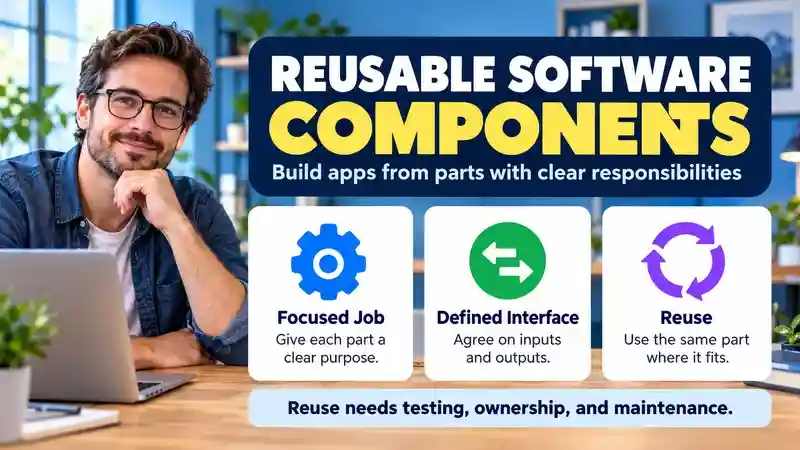
A component is designed to work as a self-contained unit, with a clear boundary around what it does. It communicates through defined inputs and outputs: a review component might receive a product’s details and display submitted ratings. Other parts of the app can use it without knowing how its internal code stores or arranges those ratings.
That boundary is what makes a component different from simply copying and pasting code. A copied section can start out looking the same, but changes must be repeated in every copy. A reusable component gives teams one defined part to maintain and use in several places, which can help keep behavior consistent.
The term “component” does not always describe the same kind of thing as “module,” “library,” or “service.” A module usually groups related code, while a library offers code that an app can call. A service often runs separately and communicates over a network. Depending on the architecture, a component may be implemented as a module, draw on a library, or communicate with a service.
These terms can overlap, so the name alone does not explain how a part works. The practical question is whether it has a clear responsibility and a usable interface. When those are well designed, teams can reuse or replace a part without needing to understand every detail of the rest of the app.
CBSE, Object-Oriented Programming, and Microservices: The Difference
These approaches describe different design choices and can coexist in one application. Component-based software engineering focuses on assembling parts with defined interfaces. Object-oriented programming organizes code around objects and classes. A component can contain many objects, so using classes does not by itself make a system component-based.
Microservices concern service boundaries and deployment: separate services communicate across a network and can be deployed independently. A component does not need its own server or deployment process. A single application can use reusable components internally, while a microservice can also be built from components. Dividing every component into a separate service adds operational work and is not a requirement of CBSE.
The Anatomy of a Reusable Component
A shopping cart is a familiar example of a reusable component. Its job might be to display selected items, quantities, and a total. The rest of the app supplies product and pricing data, so the cart does not need to fetch that information or decide how prices are calculated.
That boundary gives the component a focused responsibility: present the cart and respond to user actions, such as changing a quantity or removing an item. Its interface defines how other parts of the app provide data and receive updates. For example, the cart might accept a list of items and a total, then send a message when someone removes an item.
A predictable interface makes the cart easier to combine with different screens. A checkout page and a mini-cart in a header can use the same component, even if they arrange it differently. If the cart needs to be replaced or redesigned, other parts of the app can keep working as long as the new version follows the same interface.
Dependencies matter, too. A component may rely on formatting tools, design styles, or other software packages. Keeping those dependencies limited and clear makes the component easier to install, update, and troubleshoot. It also reduces the chance that a change elsewhere will cause unexpected behavior.
Reuse works best when teams document how a component should be used and test how it behaves. Automated tests can check that item changes update the display correctly, while accessibility checks help ensure people can use the cart with a keyboard or screen reader. Documentation can clarify expected inputs and behavior; versioning helps teams track changes and avoid surprises when updates reach multiple screens.
These practices are part of what makes component-based software engineering useful in real apps. A shared component can support consistency, but reuse alone does not guarantee it. Clear responsibilities, dependable interfaces, and regular checks help the same cart behave reliably wherever it appears.
Choosing Component Boundaries Without Overcomplicating the App
A useful boundary keeps related work together while limiting what the rest of the app needs to know. Developers describe these qualities as high cohesion and low coupling. Cohesion means the responsibilities inside a component belong together. Coupling describes how much one part depends on another.
Think about an address form. Checking whether required fields are filled belongs close to the form’s behavior. Deciding whether a customer qualifies for a delivery discount may belong in a separate business-rule component. If the form reaches directly into checkout pricing, customer records, and order storage, moving it to another screen becomes harder.
Smaller is not always better. Splitting every label or tiny operation into a separate component can make a simple feature difficult to follow. Start with a clear responsibility, then split a part when its behavior grows or different pieces need to change independently. A useful check is to ask what else must change when you update it.
What an Interface Contract Needs to Explain
An interface contract is the agreement between a component and the code using it. A list of input names is only the start. The agreement should also explain accepted data formats, required fields, outputs, error behavior, and any conditions the caller must meet.
Consider a payment-status component. What should it show while a request is still pending? What happens when the network fails, or the same update arrives twice? A clear contract gives the surrounding app a predictable way to respond instead of leaving each screen to guess.
State matters as well. A component that depends on hidden global settings is harder to move than one with explicit inputs. Decide which information the component owns and which belongs to the wider feature. React’s Thinking in React walkthrough offers a practical UI example of breaking a feature into parts and deciding how data and state connect them.
Supplying Dependencies From Outside the Component
A component may need a data source, a clock, or a notification sender. Passing that dependency in, rather than creating a fixed implementation inside the component, can make it easier to reuse and test. This technique is called dependency injection. Angular’s dependency injection guide explains one framework’s implementation, though the underlying idea is broader than Angular.
For example, a booking-confirmation component could receive a notification sender through an agreed interface. The live app supplies an email implementation; a test supplies a substitute that records what would have been sent. The component can keep its booking-related behavior without needing to know a particular email provider’s details. Add this separation where it helps; a simple component does not automatically need a dependency injection framework.
The Benefits—and Trade-Offs—of Reusing Software
When teams share a well-designed component, they can avoid rebuilding the same functionality in several places. A shared sign-in form, for example, can handle common validation once instead of requiring each product area to implement it separately. That can free developers to spend more time on features users need.
Reuse can also speed up changes and create more consistent experiences. If a team updates a shared navigation menu or accessibility behavior, the improvement can reach every screen that uses it. But the same reach creates responsibility: a faulty change may affect many parts of an app at once.
Shared components require coordination. Teams need to agree on who maintains a component, how changes are reviewed, and how other teams learn about updates. Dependency management matters, too. An app may rely on a particular component version, while another team needs a newer one, creating compatibility work.
This is especially important when several products use the same component. A change that works in one app may disrupt another because each has different assumptions or technical constraints. Automated tests and clear versioning can reduce the risk, but they do not remove the need to check how changes behave in real settings.
Reuse is not automatically efficient. Two features may look alike while serving different needs—for instance, similar-looking forms may have different privacy rules or workflows. Forcing them into one component can add exceptions and make both harder to change. In component-based software engineering, sharing makes sense when purpose and behavior are genuinely common, and the component has a clear owner and dependable interface. Otherwise, separate parts may be simpler to maintain.
A Practical Component-Based Development Workflow
In a real project, teams rarely start by collecting components and hoping they fit. They start with the task the software needs to perform. For a booking app, that might mean letting someone choose a time, confirm availability, and receive a reservation. Those requirements help define the parts worth building or reusing.

- Define the responsibilities. Separate concerns such as displaying available times, checking booking rules, and sending confirmations. Avoid giving one component every job.
- Find possible components. Look at existing internal code, maintained open-source packages, or commercial options before writing a replacement.
- Check the fit. Compare the interface, dependencies, license, accessibility needs, and expected workload with your requirements.
- Adapt and connect. An adapter can translate between an existing component’s interface and the format your app expects. Keep that translation separate from unrelated business rules.
- Test the assembled feature. Check the individual parts, their connections, and the complete user journey.
- Plan ongoing ownership. Record the version in use, who handles updates, and how a replacement or rollback would work.
Requirements may change during this process. If a calendar component cannot handle the booking rules you need, it is better to discover that in a small trial than after the rest of the app depends on it.
How to Choose a Component Before You Depend on It
A polished demo shows what a component can do under selected conditions. Your job is to find out whether it handles your conditions. Try a small example with realistic data, including missing values, long text, and the devices your users actually have.

| What to check | A useful question |
|---|---|
| Functional fit | Does it solve the required task without a growing pile of exceptions? |
| Interface and compatibility | Can your app supply the required inputs and handle its outputs and errors? |
| Maintenance | Is someone responsible for fixes, releases, and support? |
| License and cost | Do the usage terms, support fees, and any redistribution conditions fit your project? |
| Performance and accessibility | Does it work acceptably with realistic workloads and the interaction methods your users need? |
| Exit plan | Could you replace it without rebuilding the whole feature? |
Build-versus-reuse is a judgment call. Reusing a dependable date picker may save weeks. Reusing a component that needs extensive changes can cost more than a focused custom solution. Count integration, maintenance, and migration work alongside the initial price.
How Components Come Together in Modern Apps
A familiar screen is usually built from smaller pieces. A shopping page might combine buttons, search fields, forms, and product cards, each responsible for a specific task. Developers arrange these components into page layouts, then connect them to data and app behavior.
Components can also be larger than individual interface elements. A product card, for example, may include an image, price, availability, and an add-to-cart button. Several related components can form a complete feature, such as a checkout flow with a cart summary, delivery form, and payment step. This layered approach helps teams work on parts of an app without rebuilding the whole interface.
To keep those parts consistent, teams often use component libraries or design systems. A library provides shared, tested elements, while a design system also documents how they should look and behave. For users, this can mean buttons and forms that work similarly across different screens. For teams, shared guidance makes it easier to update an interface without introducing unnecessary variation.
Reuse also extends beyond screens. A service might share software components for handling payments, user accounts, or notifications across several products. But a component rarely fits every setting unchanged. A mobile app may need a smaller, faster version than a desktop site, and a service built with different technology may require an adapted interface. Performance needs, accessibility, and the expectations of different users matter too.
Component-based software engineering is therefore about more than assembling reusable parts. Teams must decide where reuse makes sense and where a component needs adjustment. When those choices are thoughtful, shared parts can reduce duplicated work while still letting each app fit its users and environment.
For a concrete UI example, React’s official introduction to components shows how reusable interface elements can be combined into larger pages. This illustrates one implementation of component reuse rather than the full scope of CBSE.
Another browser-based example is described in MDN’s Web Components guide, which explains reusable custom elements and encapsulated functionality. Web Components are a specific set of web technologies, while CBSE is the broader engineering approach.
A Backend Example: Reusing a Shipping-Cost Calculator
Imagine a retailer with a website and an order-management dashboard. Both need shipping estimates. In this hypothetical design, a shared calculation component accepts destination, parcel details, and a delivery method, then returns an estimate or a defined error. The website displays it for shoppers; the dashboard presents it to staff.
The calculation component does not need to know how either screen looks. If its rules change, both applications can adopt an updated version after testing. If an external carrier supplies live rates, an adapter can translate that carrier’s response into the component’s agreed format. The team still needs to handle timeouts, unavailable rates, and differences between an estimate and the final charge.
Testing Components Together, Not Just Separately
A search box can pass its own tests while the search page still fails. Perhaps the box sends one field name and the results component expects another. Component tests alone will not prove that the assembled feature works.
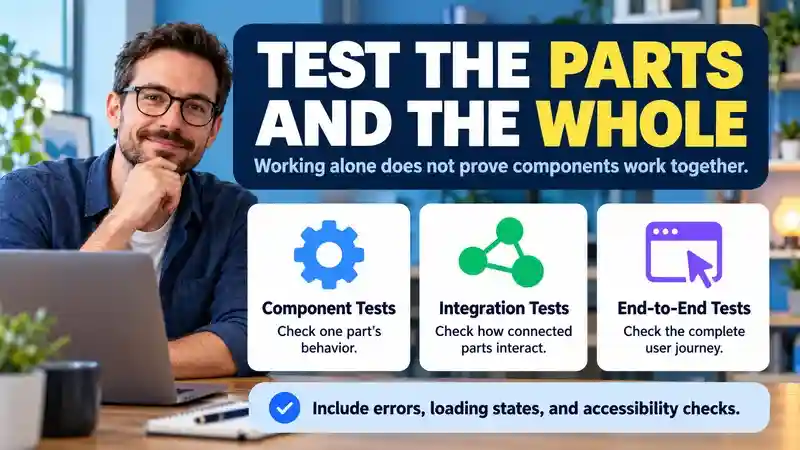
- Unit or component tests check a part’s behavior in isolation, such as handling an empty item list.
- Contract and integration tests check whether connected parts agree on data and behavior, including errors.
- End-to-end tests exercise a complete journey, such as finding a product, adding it to a cart, and completing checkout in a test environment.
Include loading states, unavailable services, keyboard interaction, and failed requests where relevant. After updating a shared component, check representative screens that use it. Under Semantic Versioning, an incompatible public-interface change calls for a major version increase, but a version number never replaces testing in your app.
Security and Maintenance Do Not Disappear With Reuse
Bringing in a component also brings in its dependencies and maintenance needs. Keep an inventory of the packages and versions your app uses, including indirect dependencies. Review security notices, remove unused packages, and obtain software from trusted official sources. These practices are consistent with OWASP’s guidance on components with known vulnerabilities.
Before an update goes live, test compatibility and decide how to recover if it causes problems. Also check what data the component can access or transmit. A reusable analytics widget, for example, deserves a privacy review as well as a visual check. An active project or a clean scan can inform the decision, but neither guarantees that a component is safe.
Introducing Component Reuse Into an Existing App
You do not need to rewrite an application to start using component-based software engineering. Pick a repeated feature with reasonably clear rules, such as a price display or a file-upload control. First record its current behavior, including the awkward cases users already depend on.
Extract one working version behind a defined interface and try it in one location. Check the surrounding workflow before replacing the other copies. Two upload controls may look identical but allow different file types or permissions; confirm whether those differences should be supported explicitly or kept in separate components.
After adoption, look for practical results: fewer duplicated fixes, manageable update work, and consistent behavior across the places using the component. Track reported errors and performance where relevant. If each new use requires another exception, revisit the boundary rather than expanding the shared component indefinitely.
Where Users Encounter Components in Everyday Digital Life
People rarely see software components directly. They encounter their effects in familiar tasks: checkout steps that guide a purchase, sign-in screens shared across services, or search filters repeated on different product pages. Media players and notification panels may also be reused across an app, helping familiar controls behave consistently.
That consistency can make everyday tasks easier. If a team fixes a confusing checkout control in a shared component, the improvement may reach several screens. But a faulty update can spread just as widely, disrupting every place that uses it. Testing shared parts across the situations where they appear helps catch problems before they affect more people.
AI features, such as a writing assistant or product recommendation tool, can also be integrated as components. They still need clear boundaries, careful testing, and privacy safeguards—and depend on the surrounding app to present results responsibly. Component-based software engineering shapes these experiences behind the scenes; good reuse can help, but it does not guarantee reliability.
For a closer look at recommendation and customer-support features, see our guide to practical uses and limitations of AI in ecommerce. It explains the data, integration, and human-review questions behind these shopping experiences.
For the broader foundations behind this work, explore our guide to computer and information science skills and career paths. It connects software development with data, security, and the needs of people using digital systems.
Frequently Asked Questions
1. What is component-based software engineering?
Component-based software engineering builds applications from smaller parts with defined responsibilities and interfaces. Teams assemble and reuse these components rather than rebuilding the same functionality for every feature or product.
2. What is an example of a reusable software component?
A shipping-cost calculator can accept parcel details, destination, and delivery method, then return an estimate. Different applications can reuse that calculation without sharing the same screen layout or user interface.
3. What are the main benefits of component-based software engineering?
Well-designed components can reduce duplicated work, support consistent behavior, and simplify shared improvements. Those benefits depend on clear interfaces, suitable boundaries, dependable maintenance, and testing across the applications using them.
4. How is CBSE different from object-oriented programming?
Object-oriented programming organizes code around objects and classes. CBSE focuses on assembling components through defined interfaces. A component may contain many objects, so the approaches can work together in one application.
5. Are software components the same as microservices?
No. A component can run inside a single application, while microservices communicate across a network and can be deployed independently. Either architecture can use reusable components within its implementation.
6. How do you choose a software component for a project?
Check its functional fit, interface, dependencies, maintenance, licensing, performance, and accessibility. Test it with realistic data and consider integration costs and replacement options before making it central to your application.
7. What testing do reusable components need?
Test individual behavior, interface agreements, connections between components, and complete user journeys. Include relevant error and loading states, and check representative applications again when a shared component changes.
8. When is component reuse a poor choice?
Reuse may be a poor fit when similar-looking features have different rules, privacy needs, or workflows. If adaptation creates too many exceptions, separate components can be easier to understand and maintain.
Conclusion
Component-based software engineering offers a practical way to build applications from parts with clear jobs and predictable interfaces. A shared cart, search control, or shipping calculator can reduce duplicated work and make changes easier to manage. The payoff comes from choosing sensible boundaries, not simply dividing code into smaller files. Before reusing a component, check whether it fits the task, works with your existing software, and has maintenance and licensing terms your team can support over time.
Reliable reuse also needs attention after the first release. Test how components work together, track dependencies, review security updates, and plan for changes that could affect other applications. When two features have different requirements, keeping them separate may be simpler than forcing them into one shared part. For readers exploring how these decisions shape everyday products, Digitally USA covers related technology topics. The useful goal is software that serves its users and remains manageable as needs change.