How to use AI to study effectively starts with a simple principle: let AI support your learning rather than do the thinking for you. It can explain ideas, create practice questions, and offer feedback on your work. But a fluent answer is not necessarily an accurate one, and reading it is not the same as understanding it.
Think of AI as a study aid, not a replacement for reading, reasoning, or practice. You still need to work through the material, test what you remember, and check whether the help you receive is reliable. Its value depends on how you use it, not on a promise of better results.
What AI Can—and Can’t—Do for Studying
Conversational AI can respond to questions and, depending on the tool, create materials such as summaries, flashcard questions, quizzes, or practice problems. You can ask it to explain a topic in simpler terms or help you work through a difficult step. These features can give you more ways to review and practice.
For a closer look at what AI assistants can and cannot reliably do, read our guide to AI systems.
But AI generates responses; it doesn’t guarantee that they’re accurate, complete, or suited to your course. Two tools may also produce different kinds of responses. A polished explanation isn’t proof that you understand the idea, and using AI doesn’t guarantee better results. You remain responsible for judging whether an answer makes sense, checking it against your course materials, and doing the work yourself. Treat generated study materials as a starting point to review—not as a replacement for trusted sources or your own practice.
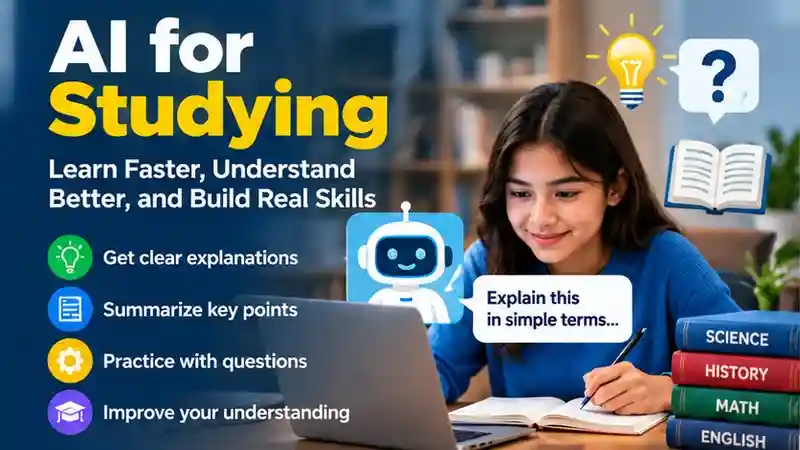
How to Use AI to Study: Start With Your Goal
To learn how to use AI to study effectively, begin by choosing a specific learning goal, such as understanding a concept or testing what you remember.
Before opening an AI tool, decide what you need to do. Are you trying to understand a concept, remember key material, practice a skill, or organize your study time? Naming the task helps you ask for relevant support instead of a broad answer that may not fit your needs.
State what you’re learning and, when permitted, provide the relevant notes, assignment instructions, or course material. For example, ask for a comparison of two concepts from your notes, or practice questions based on a specific chapter. A focused request gives the tool useful context, but it doesn’t guarantee a correct or complete response. Check its suggestions against your course materials.
Ask for Explanations That Build Understanding
A useful way to use AI to study a difficult concept is to ask for an explanation of one step, then try explaining that step yourself without looking at the response.
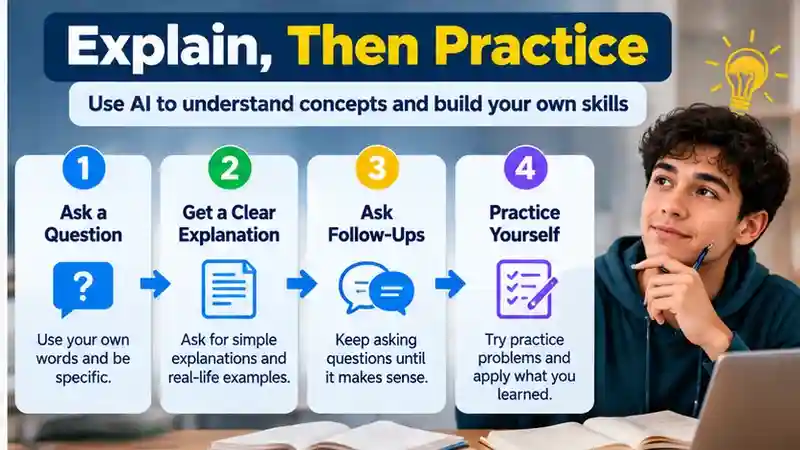
When an idea feels confusing, ask AI to explain it in a way that helps you follow the reasoning. You can request a step-by-step explanation, a simpler restatement, an analogy, or a comparison with a related concept. For example: “Explain how fractions are added to a middle-school student, using these class notes. Show the steps and explain why the denominators matter.”
If you want to improve the way you phrase instructions, our ChatGPT for Writing guide covers clearer prompts, revisions, and checking generated responses.
If one part still doesn’t make sense, ask a focused follow-up, such as “Why did you do that step?” or “How is this different from multiplying fractions?” Then close the answer and explain the idea in your own words, without copying the response. If you can describe the main steps and why they work, that’s a useful check on your understanding. If you get stuck, return to the source material and ask about the specific gap.
Turn Notes Into Active Practice
One practical way to use AI to study is to turn approved notes into practice questions, then answer them from memory before checking the responses.
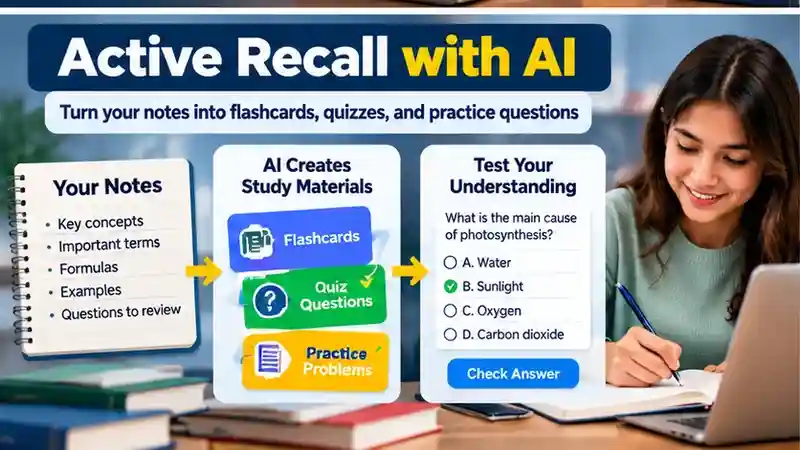
Use your notes or course materials to ask AI for flashcard questions, a short quiz, or practice problems. Specify the topic and the kind of questions you want—for example, “Create five short-answer questions from these notes, but put the answers after the questions.”
Try answering from memory before asking to see the answers. That effort to retrieve what you’ve learned helps you see what you can recall and where you’re unsure. If you get stuck, mark the question and review the relevant material before trying again.
Generated practice is a starting point, not a complete picture of what your course may assess. Check each question and answer against your notes, textbook, or other trusted course materials. Remove or correct anything that doesn’t match, and add questions on important ideas the AI missed.
Use AI for Feedback, Not Just Answers
Understanding how to use AI to study also means requesting feedback on your own attempt instead of asking for a finished answer.
Try the problem or draft first, then share your attempt and ask AI for feedback on a specific point. For example: “Here’s how I solved this equation. Which step, if any, needs another look? Don’t give me the full solution; ask a guiding question.” You could also ask it to identify a gap in your argument or point out where a paragraph becomes unclear.
This approach keeps you doing the thinking. Asking AI for a finished answer may show you what to write, but it doesn’t tell you whether you could reach or explain that answer yourself. Use feedback to decide what to review or revise, and make those decisions on your own. AI’s comments can also be mistaken or miss something important, so check them against your course materials and your understanding.
Build a Study Session Around It
When planning how to use AI to study, reserve time for independent recall and problem-solving rather than spending the whole session reading generated explanations.
A simple routine can help you use AI without handing over the work. Adapt these steps to the subject and the time you have:
- Choose a goal: decide what you want to understand, remember, or practice.
- Review trusted material, such as your notes, textbook, or other course resources.
- Practice from memory: write down what you recall or try a problem before asking AI for help.
- Use AI to clarify a confusing point or give feedback on your attempt. Compare its response with your materials.
- Note what still needs work, then return to that material or try another practice question.
You can spend more time on any step that helps, or skip AI when you don’t need it. The goal is to use the tool to support your effort, then check what you can explain or do on your own.
Prompts You Can Adapt
If you are unsure how to use AI to study a new topic, begin with a narrow prompt that names the subject, your learning level, and the kind of help you need.
Make each request specific: name the subject, your level, the source material, and the format you want when relevant. Use only notes or course materials you’re permitted to share. For example:
For guided practice, OpenAI’s Study Mode instructions explain how to ask for hints, step-by-step help, and quizzes rather than only final answers.
- For an explanation: “Explain [concept] for a [level] student using these permitted notes. Show the steps, then give a simpler restatement.”
- For a quiz: “Create [number] questions about [topic] from this material. Put the answer key after the questions so I can try them first.”
- For a hint: “I’m working on [problem]. Give me one hint at a time, without revealing the full solution.”
- For feedback: “Here’s my [solution or draft]. Identify one unclear or incorrect part and ask a question that will help me review it.”
Adjust the level and format to fit your task, and check the response against your course materials. A detailed prompt can provide useful context, but it can’t guarantee that the answer is correct.
Try ChatGPT for Studying: If you want help understanding difficult concepts, creating practice questions, or reviewing your answers, explore ChatGPT’s official Study Mode. It can guide you through topics step by step and help you test your understanding. Always check important answers against your course materials, and follow your school’s rules for AI use.
Check Answers Before You Rely on Them
An important part of how to use AI to study responsibly is checking generated answers against textbooks, class notes, and instructor-approved materials.
AI responses can be incomplete or wrong, even when they sound confident. Treat explanations, practice answers, calculations, and citations as claims to check—not as proof.
Compare an answer with your class notes, textbook, or other course materials. For a calculation, work through the steps yourself and check the result; if you’re unsure, try a different method or ask your instructor. For a factual claim, look for confirmation in a reputable reference or course resource. If AI provides a citation, verify that the source exists and supports the claim before using it.
Pay attention to mismatches: a method that differs from what your course teaches, a missing step, or a claim you can’t trace to a reliable source. When something doesn’t line up, ask your instructor or return to the original material. Don’t rely on an answer simply because it’s clearly written.
Protect Your Privacy and Follow Course Rules

Before sharing material with an AI tool, check whether it includes sensitive personal information or confidential class content. Don’t enter that information unless you have permission and understand the tool’s data settings. When in doubt, remove identifying details or ask your instructor what you can share.
For a broader discussion of responsible classroom use, see UNESCO’s guidance on generative AI in education and research, including privacy and human oversight.
Check your school’s and instructor’s rules before using AI for assignments, exams, or other graded work. Courses may set limits on whether and how AI can be used, and following those rules is part of completing the work responsibly. If the guidance is unclear, ask before you use the tool. A useful study aid should support your learning without putting private information at risk or crossing course boundaries.
Signs AI Is Getting in the Way
Knowing how to use AI to study also means recognizing when to put the tool aside and test whether you can answer questions without assistance.
Pay attention to whether AI is helping you do the learning—or doing it for you. It may be getting in the way if you:
- Rely on a summary instead of reading material your course requires.
- Copy an answer but can’t explain why it’s correct.
- Skip trying problems or recalling information on your own.
- Can’t tell which claims you checked against your course materials.
When you notice these habits, pause the AI session. Return to the original notes, reading, or problem, and try to explain or solve it without help. Then use AI only to clarify a specific gap, and verify its response against a trusted course source.
Use AI to create chances to explain ideas, recall information, and practice skills—not to skip the learning itself. Check its responses against your course materials, and use your own judgment to decide what needs more attention. A useful test is whether you can explain a concept or complete a similar task without AI afterward. If you can, the session may have supported your learning. If not, return to the material, work through the difficult part, and try again on your own.
Frequently Asked Questions
1. How can I use AI to study effectively?
Use AI to explain difficult concepts, generate practice questions, summarize approved study materials, and review your work. Combine AI assistance with independent practice and verify important information against reliable course resources.
2. Can AI help students understand difficult subjects?
AI can break down complex topics into simpler explanations, examples, and step-by-step instructions. However, students should verify the information and practice explaining concepts independently to strengthen their understanding.
3. What are the best ways to use AI for exam preparation?
Use AI to create flashcards, practice quizzes, and revision questions from your course materials. Test yourself without looking at the answers, then review mistakes and revisit topics that need improvement.
4. What are some useful AI prompts for studying?
Try prompts such as “Explain this concept step by step,” “Create five practice questions from my notes,” or “Give me a hint without revealing the answer.” Include your subject and learning level.
5. How can I verify AI-generated study answers?
Compare AI responses with textbooks, class notes, instructor-provided materials, and other reliable references. Check calculations independently and confirm that any cited sources actually support the information.
6. Is using AI for homework considered cheating?
It depends on your school’s academic integrity policies and your instructor’s rules. AI may be permitted for explanations or practice, but submitting AI-generated assignments as your own may violate course requirements.
7. Is AI useful for students of all education levels?
AI can support different learning levels through personalized explanations, examples, and practice questions. However, responses should match the student’s curriculum, and younger learners may need additional guidance.
8. How do I know if AI is helping me learn?
Test whether you can explain concepts, recall information, and solve similar problems without AI assistance. If you still depend on generated answers, spend more time reviewing and practicing independently.
Conclusion
Learning how to use AI to study effectively involves treating artificial intelligence as a supportive learning tool rather than a replacement for independent thinking. AI can help students understand difficult concepts, generate practice questions, organize study materials, and receive feedback on their work. However, meaningful learning requires more than reading generated explanations or copying completed answers. Students should actively engage with course materials, practice recalling information, and attempt problems before requesting assistance. Starting with a clear learning goal and using specific prompts can make AI-supported study sessions more focused and productive while keeping personal understanding at the center of the learning process.
Responsible AI-assisted studying also requires careful verification, academic honesty, and attention to privacy. AI-generated answers may contain mistakes, incomplete explanations, or misleading information, even when they appear convincing. Compare important responses with textbooks, class notes, and instructor-provided resources before relying on them. Follow your school’s rules regarding AI use, particularly for homework, assignments, and examinations. Avoid sharing sensitive personal information or restricted course materials without permission. After each study session, test your knowledge independently to identify what you genuinely understand and what needs additional practice. Ultimately, AI is most useful when it strengthens your learning habits, critical thinking, and ability to solve problems independently.