Best AI Image Generators are easier to compare when you start with what you want to make. A tool that works well for exploring an idea may not be the right fit for editing an existing image, creating marketing visuals, or producing a consistent set of images. There is no single best option for every task, and a polished result alone does not show whether a tool will suit your workflow.
This guide helps you choose among the best AI image generators by evaluating prompt accuracy, visual quality, editing control, and consistency across a project. It provides a repeatable comparison method rather than a hands-on product ranking. For allowances, credits, and restrictions on free accounts, use our separate free-tools guide linked below.
Before choosing a tool, consider what you plan to create, how much control you need, and whether you will use the images privately or commercially. That starting point makes it easier to find a suitable fit without assuming one generator is best for everyone.
Best AI Image Generators: What Makes a Tool Worth Using?
When evaluating the Best AI Image Generators, prioritize the features you actually need rather than relying on promotional examples.
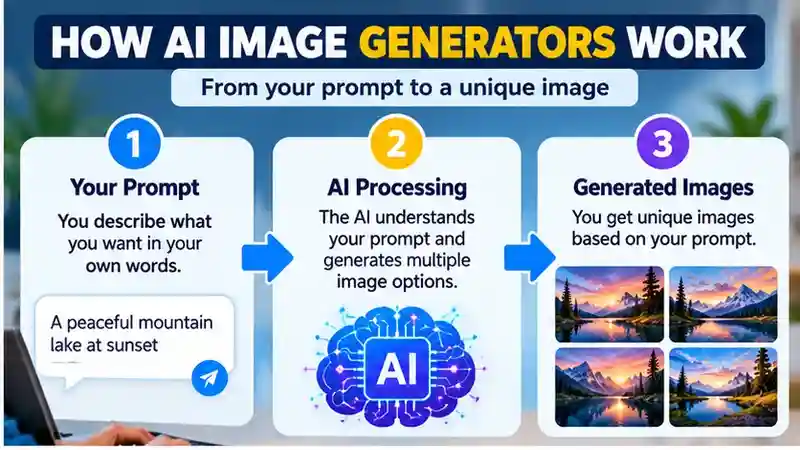
An AI image generator turns instructions—often a written prompt—into an image. Some tools also let you edit an uploaded image or create variations from an existing result. The right fit depends on the task: a tool may produce appealing images but still miss details in your instructions or lack controls that suit your workflow.
For background on how AI systems respond to instructions, see our guide to AI systems.
Compare tools across several practical criteria:
- Prompt adherence: Does the image match the requested subject, setting, composition, and style?
- Visual quality: Does the result suit its intended use, and do the details hold up on inspection?
- Editing and iteration: Can you refine an image, adjust part of it, or make useful variations without starting over?
- Ease of use and speed: Is the process clear, and does it deliver results at a pace that works for your task?
- Cost and access: Can you try the tool before paying, and do its price, limits, and availability fit your needs?
- Usage rights and privacy: Do the current terms explain how you may use the images and what happens to uploaded images or prompts?
Hands-on testing can reveal how a tool responds to the same prompts, the quality of its results, and the controls available in its interface. These findings apply to the tasks tested; other prompts and workflows may produce different results.
Price, plan limits, licensing, and data handling can change, so check each provider’s current terms before subscribing or uploading material. No one criterion determines the best fit for everyone: a casual user may prioritize simplicity, while someone creating commercial work may need clear usage terms and more editing control.
Build a Shortlist of AI Image Generators
Start with two or three candidates you can access, then give each the same small project. A shortlist of the best AI image generators should reflect the work you actually produce, whether that involves illustrations, marketing graphics, concept art, or editing existing images.
Explore AI Image Generators: If you want to compare AI image generation tools yourself, visit the official websites of ChatGPT, Adobe Firefly, Midjourney, and Ideogram. Explore their current features, editing options, pricing, and access requirements before choosing a tool. Review each provider’s privacy policy and commercial usage terms, as features and conditions may change over time.
If you want to start without paying, our guide to free AI image generators and their plan limits covers allowances, download restrictions, privacy, and usage rights. This article focuses on assessing the results and the workflow needed to produce them.
If your project also involves writing or research, our ChatGPT alternatives guide covers broader AI assistants. Keep those requirements separate from your image-quality tests.
Which Controls Should You Try in Each Tool?
The four tools above offer different ways to guide a result. Use these documented controls to build a test shortlist, then judge the output against your own brief. Feature availability can depend on the selected model and account.
ChatGPT: Try describing an edit in the same conversation, or selecting an area you want changed. OpenAI’s image guidance explains generation and editing. Test whether a requested change preserves the framing and details you wanted to keep.
Adobe Firefly: Try a composition reference when the placement and structure of objects matter. Adobe’s composition reference guidance describes matching outline and depth. Compare the arrangement with your reference rather than expecting an exact copy.
Midjourney: Try a Style Reference when you want a related visual treatment across images. Its Style Reference documentation explains using a reference alongside a text prompt. Check subject accuracy separately from the overall look.
Ideogram: Try Canvas when your workflow involves organizing images and making regional changes. Its Canvas documentation covers those tools. Use a short poster brief and inspect both the lettering and any details altered during editing.
Compare Image Quality, Prompt Accuracy, and Editing
The Best AI Image Generators for one project may not be the best for another, so evaluate prompt accuracy, editing control, and consistency separately.
To compare the Best AI Image Generators consistently, record how well each one follows the same prompt and handles revisions.
To compare image generators fairly, run the same task in each tool and keep the prompt as consistent as possible. For example, ask for an image with a clearly defined subject, setting, style, and arrangement, then check whether the key elements appear where you requested. A tool may produce an attractive image but still miss a specific composition detail.
When reviewing generated images, our AI image detectors guide explains why automated detection results should not be treated as definitive proof.
When an image carries provenance information, Content Credentials can provide context about how it was created and edited. Review that history separately from visual quality; it does not replace checking the image for errors.
Try a prompt that includes visible wording, such as a short sign or label, if text in images matters for your work. Inspect whether the wording is accurate and legible; generated text may need to be added or corrected elsewhere. You can also ask each tool for variations, then see whether they offer useful alternatives or drift away from the original brief.
To assess editing, start with the same image where possible and try one small change, such as adjusting the background while keeping the subject. Note whether the tool supports that task and how much of the result changes. The available controls and workflow matter alongside the image itself.
Keep a simple comparison record for each candidate: the prompt, selected model or mode, output dimensions, unwanted details, revisions requested, and time spent fixing the image. Review several outputs where your access allows it. One impressive result is less useful than a process you can repeat.
Use a Small Comparison Scorecard
Give each candidate the same three tasks: an original image, a version containing a short phrase, and a controlled edit of an existing result. Keep the aspect ratio and brief consistent, and record the model or mode used. This is a suggested test method, not a set of measured scores.
For each task, mark prompt accuracy, visible defects, text accuracy, editing preservation, and correction effort as acceptable, needs work, or unsuitable. Write one concrete reason beside each judgment—for example, “the requested empty space is missing” or “the background edit changed the product shape.”
Choose your must-have requirements before testing. A beautiful image should not compensate for an incorrect product, unreadable required text, or an edit that changes essential details. Where two candidates meet the brief, compare the time and manual work needed to finish the asset.
Record unsuccessful attempts as well as usable ones. Judge repeatability across a few relevant tasks, and distinguish a tool you have not learned yet from one that lacks the control your project requires.
Choose by your use case
Choosing among the Best AI Image Generators starts with the intended output, whether that is a concept illustration, social graphic, or edited photo.
Choose the task that matters most before comparing the best AI image generators. The examples below identify practical checks for different projects; they are not product-specific test results.
For one provider’s current product and commercial-use information, consult the official Adobe Firefly FAQ; check the applicable terms for your intended use.
Learning and experimentation: Look for a clear interface, understandable controls, and a straightforward way to revise a result. A tool that helps you understand why a change worked can be more useful than one that only produces an attractive first image.
Social and marketing visuals: Look for control over composition, subject placement, and style. If an image needs readable wording, inspect it carefully and be prepared to add or correct text elsewhere. Review the finished asset before publishing.
Concept art: Test how well the generator follows instructions about the subject, setting, and visual style. If you want to explore alternatives, check whether it can create useful variations or refine a result without changing details you want to keep.
Product mockups: Decide how closely the image must match the real product. A generated mockup may help explore an idea, but check it for inaccuracies before showing it to customers or using it to represent an actual item.
Image editing: Confirm that the tool supports the change you need, such as working from an uploaded image or editing only part of it. For precise, repeatable edits, a dedicated image-editing workflow may be a better fit than a general-purpose generator.
For any use case, compare a small number of tools using the same prompt. Consider both the result and the effort needed to get it. If you plan to use an image commercially, check the current usage terms as well as its visual quality.
Check Workflow Fit Before Committing
Even the Best AI Image Generators require a careful review of current commercial-use terms, upload policies, and subscription limits.

Check how an image moves through your existing workflow: generation, revision, export, layout, and final review. Try placing a sample into the actual presentation, design file, or publishing tool you use. Notice whether you can preserve the composition, make precise corrections, and keep an original version for later changes.
For U.S. copyright considerations, review the U.S. Copyright Office’s AI resources, which discuss authorship and copyrightability of AI-generated material.
If you plan to publish or sell generated images, read the current terms on commercial use, ownership, and licensing. These are separate questions: permission to use an image does not necessarily mean you have exclusive rights to it. Do not assume commercial use is automatically allowed or that an output is exclusive.
Before uploading an image, review how the provider handles prompts and files. Check whether uploads may be retained, how long they are kept, and whether the terms describe other uses of submitted material. An upload should not be treated as private unless the provider’s current policies support that expectation.
Also look for restrictions on sensitive or prohibited content, including any rules relevant to your intended project. Policies and terms vary between providers and can change. Verify them directly before relying on a tool for paid work or sharing material you would not want retained or used beyond your immediate request.
Write Better Prompts and Test Revisions
You can compare the Best AI Image Generators more fairly by keeping your subject, composition, and style instructions consistent across tests.
Testing the Best AI Image Generators with a clear prompt helps reveal differences in composition, text accuracy, and refinement options.
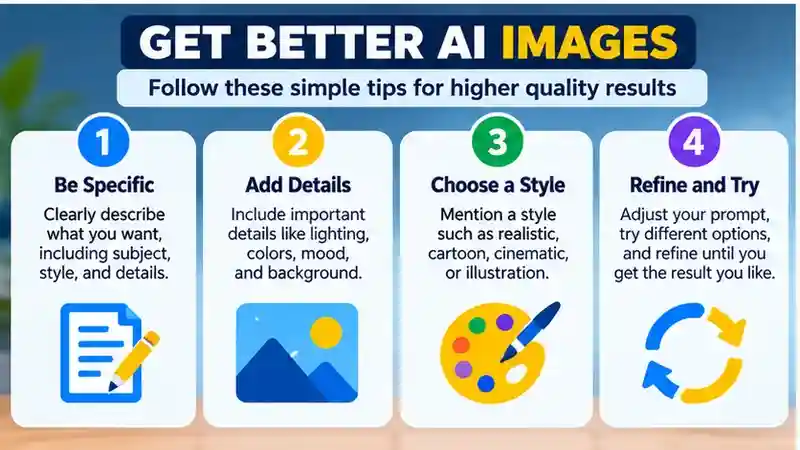
A clear prompt gives an image generator useful direction, though results vary by tool. Try this workflow:
- Describe the subject and setting, such as a ceramic mug on a kitchen counter.
- Specify the composition and style: for example, how the subject is arranged and whether you want a product photo or a simple illustration.
- Add lighting and constraints, such as soft window light and details to avoid or keep unchanged.
- Review the result, then adjust one element at a time. If the image is too dark, change the lighting instruction without rewriting the whole prompt.
For example, you could ask for a blue ceramic mug on a kitchen counter, centered in the frame, in a clean editorial style with soft morning light and no extra objects. That wording does not guarantee a particular result: prompt behavior differs across tools. Inspect the image before using it, since generated lettering may be inaccurate and fine details may need correction.
For a consistent set, save your approved brief, color palette, aspect ratio, and reference material you have permission to use. Generate a second related image and compare the subject, proportions, lighting, and style. Judge whether the set looks coherent rather than evaluating every image in isolation.
A useful final test is a small revision: keep the subject and framing unchanged, but request a different background. If unrelated details change, record the extra correction work. The best AI image generators for your project should help you reach an acceptable result with a manageable amount of editing.
Inspect the Finished Image Before Publishing
Review the image at its intended display size and at full size. Check object counts, edges, reflections, perspective, repeated patterns, and any recognizable details. For images containing people, examine anatomy and expressions. For products, compare shape, labels, colors, and proportions with the real item.
Read every visible word, number, and symbol. If a heading or label must be exact, consider leaving space in the generated image and adding editable text in a design tool. For factual diagrams, charts, or step-by-step instructions, use a tool that lets you control and verify the information precisely.
When to Revise, Edit Manually, or Start Again
Revise the prompt when the subject, framing, or overall style misses the brief. Try a regional edit for one isolated problem, then inspect the surrounding area for unintended changes. Use a conventional editor for exact typography, alignment, and small layout corrections that must stay predictable.
Start again when fixing one area repeatedly damages another or the underlying composition cannot serve the project. Keep an untouched original and compare revisions side by side. If the final asset still misrepresents a product or communicates incorrect information, replace it rather than treating a polished appearance as approval.
Frequently Asked Questions
1. What is the best AI image generator for beginners?
The best AI image generator for beginners depends on their creative goals and preferred workflow. ChatGPT, Adobe Firefly, Midjourney, and Ideogram are options to explore. Compare their current features, accessibility, and pricing before choosing.
2. How do I choose the best AI image generator?
Consider prompt accuracy, image quality, editing features, ease of use, pricing, and commercial usage rights. Test a few generators with similar prompts to determine which produces suitable results for your projects.
3. How do I compare image quality fairly?
Use the same brief, aspect ratio, and intended destination for each tool. Inspect composition, detail, and accuracy at full size, then compare several results rather than selecting only the strongest example.
4. Which AI image generator is best for realistic images?
There is no universally best generator for realistic images. Compare several tools using the same detailed prompt, then examine lighting, textures, proportions, and other visual details to find a suitable option.
5. Can AI image generators edit existing photos?
Some AI image generators allow users to upload photos, change backgrounds, remove objects, or modify selected areas. Editing capabilities vary, so confirm the available features before choosing a tool.
6. Why does consistency matter for a series of images?
A series needs a recognizable style, stable subject details, and compatible lighting and colors. Test related images together, because strong individual outputs can still look mismatched in a campaign or presentation.
7. Can I use AI-generated images for commercial purposes?
Commercial usage depends on the provider’s licensing terms and applicable rights. Review current policies before using AI-generated images for websites, advertising, products, or client projects.
8. How can I improve AI-generated image quality?
Write detailed prompts describing the subject, composition, style, lighting, and important constraints. Review each result carefully and refine individual instructions to improve accuracy and consistency.
Conclusion
Choosing the best AI image generators starts with a clear brief and a realistic test. Compare how closely each tool follows instructions, how well its details hold up, and how much control you have when making changes. For a series of images, check consistency across the set as well as the quality of individual results. Keep a record of the prompts, settings, revisions, and correction work so your decision reflects the process you will actually use.
Begin with a small project before committing to a new workflow. Put a sample into its final layout, inspect it at the intended size, and make one controlled revision to see what stays intact. Review the provider’s current terms before uploading sensitive references or using an output commercially. If your main question is what you can create without paying, follow the linked free-tools guide for plan limits and restrictions, then return here to compare creative control and usable results.