
Build AI agent without coding: start with a small, clearly defined workflow, such as sorting incoming requests or answering routine questions. A no-code AI agent builder can help you connect instructions, information, and actions without writing software yourself. But “no-code” does not mean no setup: you still need to choose a suitable builder, set boundaries, and decide what happens when the agent is unsure.
Test its answers and actions before relying on them.
How to Build AI Agent Without Coding: What a No-Code Builder Is
A no-code AI agent builder is a tool for assembling software that uses AI to work on a task, usually through a visual interface rather than hand-written code. You provide instructions and relevant context, and the agent may use connected tools—such as a source of information or another service—to take steps toward a goal.
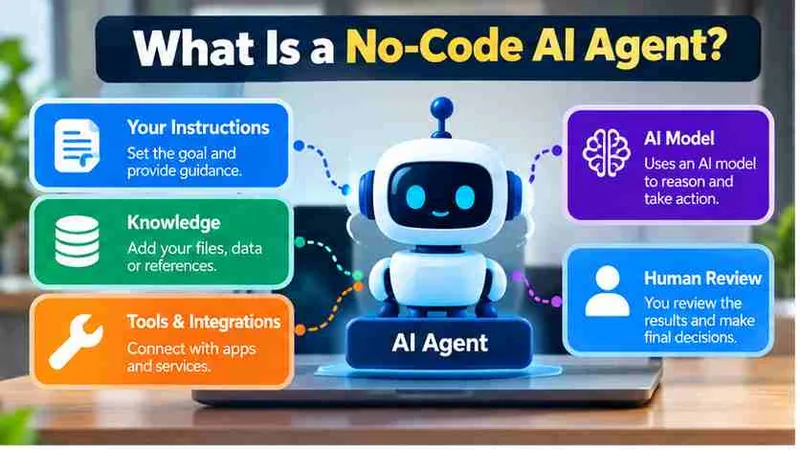
That makes an agent different from a basic chatbot, which may mainly respond to messages, and from a fixed automation, which follows preset rules. An agent may have some flexibility in how it handles a request, while a fixed automation typically follows a defined sequence.
The boundaries are not universal: products use “agent” in different ways, and some combine chat, automation, and AI features. Check what a builder actually lets you configure before assuming it can make decisions or take actions on its own.
If you are comparing no-code workflows with running AI software on your own hardware, our self-hosted AI guide covers setup, privacy, and maintenance considerations.
What these builders can help you do
Depending on the builder and how you configure it, an AI agent may help with a small range of repeatable tasks. For example, you might set one up to:
- Answer routine questions using information you provide, such as internal guidance or product details.
- Sort or route incoming requests based on their content.
- Carry out steps in a connected workflow, such as passing information to another service.
These are possible uses, not guaranteed features or outcomes. An agent’s capabilities depend on the builder, the integrations it supports, the information and instructions you give it, and the rules you set for acting or handing work to a person.
A tool that can respond to questions may not be able to take actions, and a connected service may require additional setup or permissions. Start with the task you want to improve, then check whether a builder can support it safely and reliably.
How a no-code agent works
To build AI agent without coding, you typically combine a few building blocks, though the setup varies by product. Instructions describe the task, the limits the agent should follow, and how it should respond. A model processes those instructions and the user’s request to produce an answer or decide on a next step.

For a broader explanation of the models, connected tools, and workflows behind these systems, read our guide to how AI systems work.
Knowledge or context gives the agent information to work with. This might be material you supply or details provided during a conversation. Some builders also let you connect tools, such as another service, so the agent can pass along information or perform an action. A connection does not automatically mean every action is appropriate; you still need to set permissions and boundaries.
Rules can guide when the agent should act, ask for more information, stop, or hand a request to a person. For example, you might tell it to escalate questions that fall outside its supplied guidance. Not every builder offers the same components or controls, so check what you can configure before choosing one.
When a no-code approach makes sense
A no-code agent may suit a task that comes up regularly, has clear boundaries, and is easy to check. For example, it might sort routine requests into a few categories or answer common questions using information you provide. Before building, ask: Can I describe what a good result looks like?
Can I spot a mistake? What happens if the agent gets it wrong? If the consequences are manageable and you can send uncertain cases to a person, a small trial may be reasonable.
If you need greater flexibility or want to compare visual builders with developer-focused alternatives, see our guide to open source AI agents.
A no-code approach may be a poor fit when the task needs custom logic, precise control over many steps, or dependable judgment in a high-impact situation. In those cases, a simple visual workflow may not provide enough control, and errors may be difficult to contain.
Treat this as a decision aid, not a blanket recommendation: match the tool to the task, and keep a person involved wherever the risks call for review.
How to evaluate a builder
When you build AI agent without coding, compare builders against the task you want to handle, not just the features listed on a product page. Consider how easy it is to set up a basic workflow, whether the services you need are supported, and how much control you have over the agent’s behavior.
Look closely at how each builder handles knowledge: Can you provide the information the agent needs, and can you check what it uses when responding? Also consider what tools are available for testing and monitoring, what happens when the agent reaches a limit, and whether a person can review or approve actions.
Before choosing, check current product documentation for feature availability and limits. Review pricing carefully, including which capabilities or usage may affect the cost. Read the provider’s data practices to understand what information is processed and how it is handled. Finally, note any customization limits: a builder may be easy to start with but lack controls your workflow requires.
These checks can help you rule out a poor fit before investing time in setup.
Explore a No-Code AI Agent Builder
If you want to explore how no-code AI agents work in practice, you can visit Zapier Agents, an AI agent-building platform designed to help users create automated workflows with connected applications. You can explore its available features, supported integrations, and setup options to understand how an AI agent might fit your needs. Review the current pricing, permissions, and limitations before building or deploying an agent.
Explore Official AI Agent Builder Documentation
To learn how no-code AI agents can be configured and used in automated workflows, explore the official AI by Zapier documentation. It explains how Zapier is bringing AI agent capabilities into its automation platform. Review the current setup instructions, supported integrations, permissions, and usage requirements before creating a workflow.
A simple first-build process
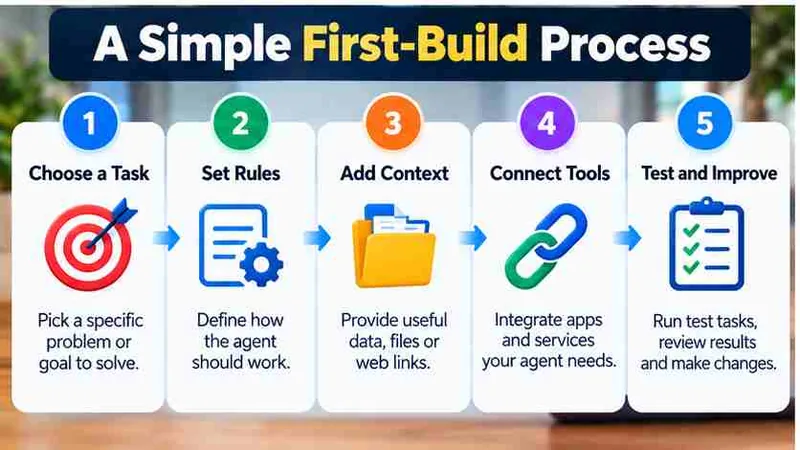
To build AI agent without coding, choose one task. Describe a single, repeatable job, such as routing incoming requests. Set boundaries: what should the agent handle, and what is outside its scope?
Write clear instructions. Explain the goal, the expected response or action, and any rules it must follow. Include what to do when information is missing or a request falls outside the task.
Add only the context it needs. Provide relevant, up-to-date information rather than connecting or uploading material just in case. Check that the agent can use the context as intended.
Connect a tool only if needed. If the task requires passing information to another service or taking an action, add the necessary connection and limit its permissions to the task.
Set stop and handoff conditions. Tell the agent to pause or send the request to a person when it is uncertain, lacks necessary details, or encounters an out-of-scope case.
Test before sharing. Try realistic requests and check the answers, actions, and fallback behavior. Fix problems and test again before making the workflow available to others.
Test the agent before you depend on it
Once you build AI agent without coding, try it with different kinds of requests before sharing it or connecting it to real work. Include normal requests it should handle, ambiguous ones that could be interpreted in more than one way, incomplete requests that lack key details, and out-of-scope requests it should decline or hand off.
For each test, check whether the answer is accurate based on the information provided and whether the agent chose the right action. If it cannot respond reliably, does it explain its uncertainty, ask for clarification, stop, or send the request to a person as instructed? Also check what happens when a connected tool fails or the agent lacks the information it needs.
Keep a record of problems, such as incorrect answers, unexpected actions, or missing handoffs. Adjust the instructions, context, or permissions as needed, then repeat the relevant tests. Retesting after changes can help reveal whether a fix worked or introduced a new issue.
Privacy, security, and reliability checks
Before connecting an agent to real work, check what information it and any connected services will receive. Review how access is controlled, what data may be stored, and what happens to it after use. Consult the builder’s current documentation rather than assuming its practices or controls.
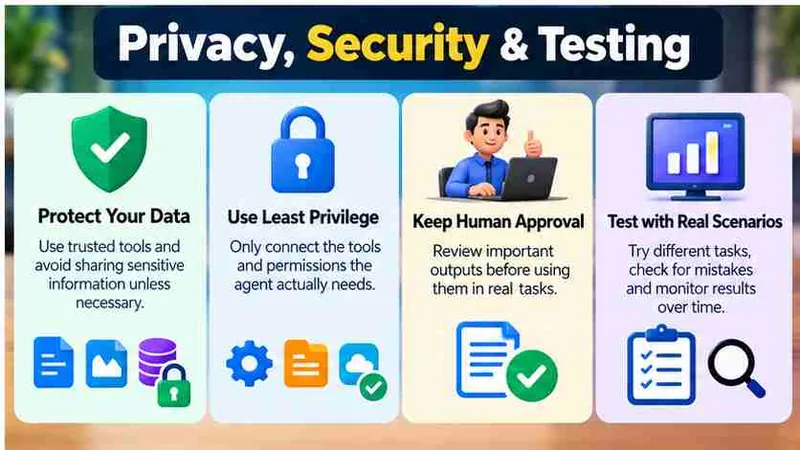
When connecting an agent to another application, apply the principle of least privilege. For a practical example of permission controls, see GitHub’s documentation on choosing app permissions. The exact settings will depend on your chosen builder and integrations.
Give the agent only the information and permissions it needs for its task. Excessive access can increase the impact of an unintended action, such as sending or changing information when it should have paused. Incorrect answers are another risk, even when a response sounds confident.
Limit what the agent can do, and require a person to review sensitive answers or approve consequential actions where appropriate. Keep a clear handoff option for cases the agent cannot handle. These checks won’t guarantee reliable behavior, but they can help you contain mistakes while you assess whether the workflow is suitable.
Common mistakes to avoid
Avoid giving the agent a broad goal, such as “handle customer requests,” without defining which requests it should handle. Vague instructions can also leave it unclear what to do when details are missing. A narrower task and a clear fallback—such as asking for clarification or handing the request to a person—can help contain mistakes.
For additional guidance on restricting what AI-powered tools can do, review OWASP’s guidance on excessive agency. It explains why broad permissions and unnecessary autonomy can increase risk in connected AI workflows.
Don’t add integrations the task doesn’t need, or assume a fluent answer is a correct one. Check responses and actions against the information provided. Finally, don’t treat launch as the end of testing: review the workflow regularly and retest it after changes.
How to decide whether to keep using it
Compare the agent’s verified usefulness with your current process. Does it handle the task acceptably in your tests, and do the time or effort saved outweigh the costs, maintenance, and risks? Include the work needed to review outputs and update instructions or context.
If the agent creates more checking than it saves, or its limitations are hard to manage, keep using the existing process or revise the workflow. Expand only after the initial task performs acceptably and you understand where it can fail.
The practical test is simple: keep it only if it helps with a clearly bounded job and you can manage its risks.
Frequently Asked Questions
1. What is a no-code AI agent builder?
A no-code AI agent builder is a platform that lets users create AI-powered workflows through a visual interface without traditional programming. Features and customization options vary by platform.
2. How do no-code AI agents work?
No-code AI agents use instructions, AI models, relevant information, and sometimes connected applications to complete tasks. Their actions depend on the workflow configuration and available integrations.
3. What can I automate with a no-code AI agent?
Depending on the platform, you may automate routine questions, request sorting, information routing, and steps involving connected applications. Start with a clearly defined, repeatable task.
4. Do I need coding skills to build an AI agent?
Many no-code AI agent builders do not require traditional programming skills. However, you still need to configure instructions, connect tools, manage permissions, and test the workflow.
5. How do I choose the best no-code AI agent builder?
Compare builders based on supported integrations, ease of setup, customization, pricing, privacy controls, and testing features. Choose a platform that supports your specific automation requirements.
6. Are no-code AI agent builders free?
Pricing varies by provider. Some platforms may offer limited free access, while advanced features, integrations, or higher usage may require payment. Check current official pricing before subscribing.
7. Are no-code AI agents safe to use?
Safety depends on the platform, connected services, permissions, and workflow configuration. Limit access to necessary information, test actions carefully, and require human approval for consequential tasks.
8. What are the limitations of no-code AI agents?
No-code AI agents may produce inaccurate responses, misunderstand instructions, or encounter integration and customization restrictions. Regular testing, monitoring, and clear fallback rules help manage these limitations.
Conclusion
No-code AI agent builders can help individuals and businesses create AI-powered workflows without traditional programming skills. These platforms may support tasks such as answering routine questions, organizing incoming requests, and connecting information across applications. However, successful automation requires more than selecting a visual builder and entering basic instructions.
Start by identifying one repetitive task with clear goals, manageable risks, and results you can easily evaluate. Compare available platforms based on their supported integrations, configuration options, pricing, and privacy practices. The best no-code AI agent builder is one that fits your actual workflow and provides sufficient control over how information is processed and actions are performed.
Before deploying a no-code AI agent, establish clear instructions, limit unnecessary permissions, and define when the workflow should stop or request human assistance. Test the agent with realistic scenarios, including incomplete requests, unexpected inputs, and connected-service failures. Review its responses and actions to identify errors before expanding its responsibilities.
Remember that AI-generated results may be inaccurate and that automation does not eliminate the need for oversight. Evaluate whether the time saved outweighs setup, monitoring, and maintenance costs. By starting with a small workflow, verifying performance, and expanding gradually, you can make a more informed decision about whether no-code AI agent builders are useful for your needs.